















JVM3160RFSS - Instructions
Keep searches simple. Use keywords, e.g. "leaking", "pump", "broken" or "fit".
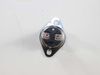
Thermal Fuse out
There are videos on YouTube on how to do this but there are a couple of things I’m going to recommend. Color code your plugs when you take the main control panel off, be patient when removing the screws on the thermal fuse use a 45 degree screwdriver but replace the screws with a small hex head self tapper screw for next time. The difference between these two lookalike fuses is that one is for the fan and the other one is the thermal there’s a price difference and volts so read the back of the bad fuse. These guys are great man and thank you for helping me out.
Parts Used:

-
Jorge from PANORAMA CITY, CA
-
Difficulty Level:A Bit Difficult
-
Total Repair Time:30 - 60 mins
-
Tools:Screw drivers
5 of 5 people
found this instruction helpful.
Was this instruction helpful to you?
Thank you for voting!
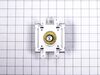
Microwave stopped heating
Using some help, removed the above the range microwave. Took apart parts of the microwave to get to the magnetron. Removed existing magnetron, inserted the new magnetron. Put the microwave back together. Tested the microwave to insure the magnetron was working before reinstalling. It did heat. Then reinstalled it back above the range.
Parts Used:
-
Mary from CORRIGAN, TX
-
Difficulty Level:Really Easy
-
Total Repair Time:1- 2 hours
-
Tools:Screw drivers
5 of 6 people
found this instruction helpful.
Was this instruction helpful to you?
Thank you for voting!
The old ones broken

-
DIANE from PORT ORANGE, FL
-
Difficulty Level:Really Easy
-
Total Repair Time:30 - 60 mins
5 of 7 people
found this instruction helpful.
Was this instruction helpful to you?
Thank you for voting!
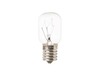
Light bulb went out on my microwave/ventahood. It's the bulb under the microwave that lights up the cooktop area.
Using a screwdriver, removed the cover, pulled out the bad bulb, and easily put in the new one.
Parts Used:
-
James from FORREST CITY, AR
-
Difficulty Level:Really Easy
-
Total Repair Time:Less than 15 mins
-
Tools:Screw drivers
8 of 16 people
found this instruction helpful.
Was this instruction helpful to you?
Thank you for voting!
Mirowave door latch
While installing a filter in my brand new never been used microwave range hood combo I snapped off the top door latch with my elbow. After a few expletives I search You Tube and found it was a simple fix. I ordered a replacement latch from this site. It arrived in three days and it took 5 minutes to fix.
Parts Used:
-
Fernando from WEST CHESTER, PA
-
Difficulty Level:Really Easy
-
Total Repair Time:Less than 15 mins
6 of 11 people
found this instruction helpful.
Was this instruction helpful to you?
Thank you for voting!
microwave dish would not move back and forth
unscrewed the bottom of the microwave and unplugged old part then took the screw out and put new one in. Super easy!
Parts Used:
-
Susan from HENDERSON, NV
-
Difficulty Level:Really Easy
-
Total Repair Time:15 - 30 mins
-
Tools:Screw drivers
7 of 14 people
found this instruction helpful.
Was this instruction helpful to you?
Thank you for voting!
When the MW door was opened a fan would start running. Close the door the fan would go off.
Removed the MW from the wall. Took the top screws off the air vent. Then removed the two screws holding on the display. I then moved the display to its side and it revealed the micro switches. I removed the plug in leads from the micro switch one at a time. I did this with all three micro switches only one at a time. I reinstalled everything and plugged it in. No more fans starting when the door is opened.
Parts Used:


-
vic from Allen, TX
-
Difficulty Level:Easy
-
Total Repair Time:15 - 30 mins
-
Tools:Screw drivers
4 of 6 people
found this instruction helpful.
Was this instruction helpful to you?
Thank you for voting!
Charcoal Filter replaced
Open the microwave door, push the press and release door that is located across the top of the oven. Remove and replace filter, close access door, close microwave.
Parts Used:
-
Glenn from SAN ANTONIO, TX
-
Difficulty Level:Very Easy
-
Total Repair Time:Less than 15 mins
15 of 39 people
found this instruction helpful.
Was this instruction helpful to you?
Thank you for voting!
Door switch was burnt out
-
Edward from ORCHARD PARK, NY
-
Difficulty Level:Really Easy
-
Total Repair Time:15 - 30 mins
-
Tools:Nutdriver
5 of 10 people
found this instruction helpful.
Was this instruction helpful to you?
Thank you for voting!
the turntable ring broke
-
EDWARD from NORTH EASTON, MA
-
Difficulty Level:Very Easy
-
Total Repair Time:Less than 15 mins
2 of 2 people
found this instruction helpful.
Was this instruction helpful to you?
Thank you for voting!
Turn table motor malfunctioning, noisy and intermittent.
My oven is installed above the counter making it a bit difficult to reach the screws closest to the wall. Instructions should note that both harnesses need to be disconnected and that there are two screws, not one holding the motor. This one issue made it frustrating since that screw is located towards the back away from your vision. This is when the flash light and a bit of contortions were required.
Parts Used:

-
Susana from PHOENIX, AZ
-
Difficulty Level:A Bit Difficult
-
Total Repair Time:30 - 60 mins
-
Tools:Screw drivers
2 of 2 people
found this instruction helpful.
Was this instruction helpful to you?
Thank you for voting!
did not include screw to secure it to celing of the microwave rempved
removed old cover put the new one in place found right size screw from my tool box, tightened it.
Parts Used:

-
Bill from TAMARAC, FL
-
Difficulty Level:Really Easy
-
Total Repair Time:30 - 60 mins
-
Tools:Screw drivers
2 of 3 people
found this instruction helpful.
Was this instruction helpful to you?
Thank you for voting!
door switch monitor broke ,tripped breaker
when on line to see how to replace the micro switch, very helpful.be careful removing door latching housing & vent cover.unplug control panel & set aside so it's out of the way.
Parts Used:
-
Earl from STOW, OH
-
Difficulty Level:A Bit Difficult
-
Total Repair Time:1- 2 hours
-
Tools:Screw drivers
2 of 3 people
found this instruction helpful.
Was this instruction helpful to you?
Thank you for voting!
The Microwave was completely dead and wouldn't run, light up or anything.
I followed an old appliance repair forums post from 2008 that discussed this exact common issue with this LG model. It took me quite a while to find the info. Then I used the schematic diagrams on your website to find where the part was located inside the microwave. I removed the outer cover. I tested all components including the thermostat for continuity with a multimeter. I discovered there wasn't any continuity in the thermostat so ordered the part and replaced it. Everything works like a charm! Thanks for the great, fast service.
Parts Used:
-
Christopher from SHERWOOD, OR
-
Difficulty Level:Easy
-
Total Repair Time:1- 2 hours
-
Tools:Pliers, Screw drivers
3 of 6 people
found this instruction helpful.
Was this instruction helpful to you?
Thank you for voting!
My microwave started tripping the breaker
Yes, it started tripping the breaker and at the end it wouldn't work at all, I started checking continuity on all door switches everything checked good, then I proceeded to check the thermostats and found out that one didnt have continuity so I replaced it. Every thing works good except that as soon as I pluged the microwave to the outlet the exhaust fan comes on and does not shut off. Does anyone known why or do I need to change something else.
Thanks
Thanks
Parts Used:
-
Juan from FONTANA, CA
-
Difficulty Level:Really Easy
-
Total Repair Time:15 - 30 mins
-
Tools:Screw drivers
2 of 3 people
found this instruction helpful.
Was this instruction helpful to you?
Thank you for voting!