















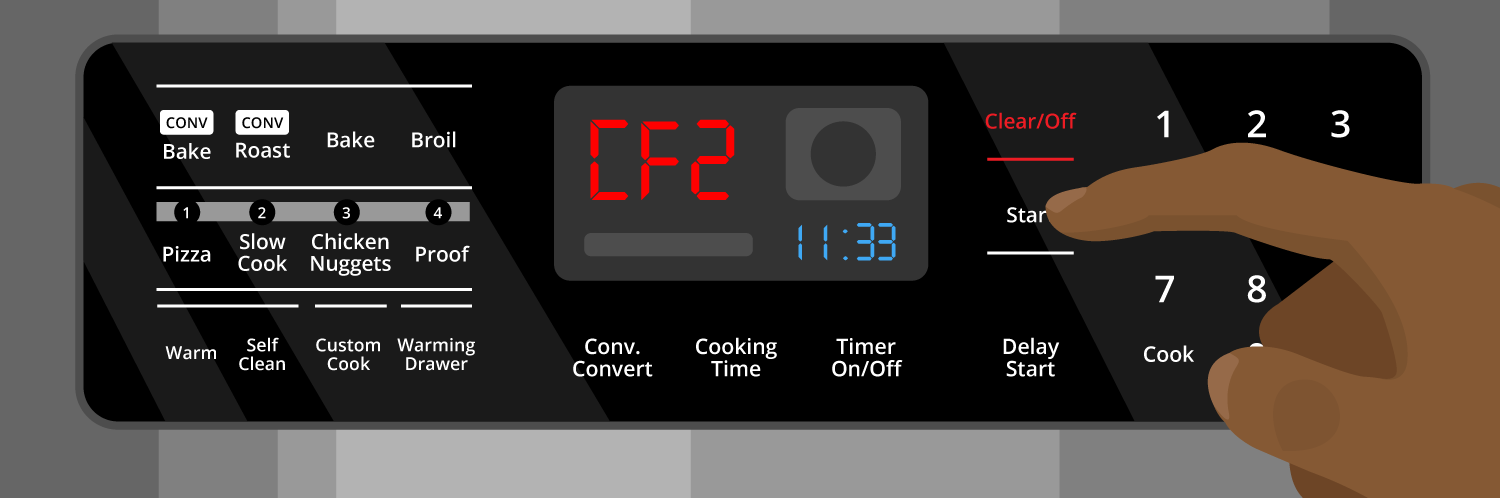
How to Clear the Samsung Range C-F2 Error Code
The C-F2 error on your Samsung oven is an indication that there is a communication problem between the touchpad and the main control board. You may notice that the touch controls are either unresponsive or responding in a different location than where you actually touched. Seeing this error code displayed on your oven can be frustrating, but this step-by-step guide is designed to provide you with all the information you need to clear the code and restore your oven in no time!
How to Reset Your Samsung Range to Clear a C-F2 Error
The most common way to clear the C-F2 error on your Samsung range is to reset the appliance. The steps for resetting your oven might vary slightly depending on the exact model you own, therefore, it’s always a good idea to consult your manual when you are unsure. However, you can follow the methods listed below which are applicable for a wide range of Samsung ovens:
1. Unplug the RangeAccess the rear side of your appliance and unplug the oven from the power outlet.Wait for 1-3 minutes and then plug back it in and check to see if the code is cleared.
2. Switch Off the Circuit BreakerLocate the circuit breaker, which you can find behind the service panel in your home. Flip the switch labelled "oven" or "stove" to switch off the circuit breaker to your oven. Wait for 1-3 minutes and then flip the switch again.Wait for your oven to restart and confirm that the error code is no longer displayed.
If you followed the steps above to clear the C-F2 error code from your oven and the error code is still displayed, there is likely a fault either in the touchpad, the control board, or the wire harness that connects them, known as the ribbon cable. To remove the code and fix your oven, you will need to access and replace these faulty part(s). Before beginning any repairs, ensure that the circuit breaker is switched or the oven is disconnected from the power source to prevent electrical shocks.
How to Resolve the C-F2 Communication Error in a Samsung Range
1. TouchpadThe touchpad (touch IC) is the user interface for the oven. It allows you to use and control all the functions of your oven such as the temperature, cooking modes, and timers. When you press a button or touch a part of the touchpad, it sends a signal to the control board, which then processes the input and responds in the appropriate way. If the touchpad itself is malfunctioning, you may be unable to control these functions and you may be faced with the C-F2 error.
Find the right touchpad for your Samsung range.
2. Ribbon CableThe ribbon cable is a flat, wide cable made up of several small wires. It connects the touchpad to the control board and provides the communication link that allows you to use your oven. When you make a selection on the touchpad, the instruction is sent through the ribbon cable to the control board for processing. Similarly, feedback from the control board to update the display or illuminate certain indicators on the touchpad is also sent via this cable. If this cable is not well-connected, damaged, or experiencing electrical failure, it will not be allow communication to flow between the touchpad and control board, resulting in the C-F2 error.
Find the right replacement cable for your Samsung range.
3. Control BoardThe control board (main or submicom), is connected to the touchpad and digital display. It manages and regulates the various functions of the range using instructions from the touchpad. It also communicates with various sensors within the oven to ensure the selected function is achieved. If it is malfunctioning, it may not be able to communicate with the touchpad, resulting in the C-F2 error. You may also have difficulties controlling the oven or using the touchpad itself.
Find the right replacement control board for your Samsung range.
How to Replace the Touchpad or Ribbon Cable in a Samsung Oven to Clear C-F2 Error
- To access the touchpad you will need to begin by removing the mounting screws that hold the control panel to the oven. You can typically find them around the perimeter or inside the top edge of the oven door frame.
- Carefully lift or tilt the control panel forward.
- Locate the touchpad which will be connected to the control board with a ribbon cable, and take a picture of how the cable is routed and connected.
- Inspect the cable and touchpad to check if they are securely connected, or if there are signs of damage or electrical failure.
- Once you have confirmed a fault in the touch pad or ribbon cable, you can replace the faulty part to clear the C-F2 error code.
- Remove any clips or fasteners that secure the cable and carefully disconnect it from the control board. If the fault is in the ribbon cable, you can now replace it with the new one and reassemble the oven. Otherwise, continue with the next steps to replace the touchpad
- Remove the touchpad from the control panel which may be held in place with adhesive or screws. In the case of adhesive, use a plastic tool to carefully pry the touchpad off to avoid damaging the control panel.
- Attach the new touchpad to the control panel, and ensure that it is oriented correctly and well-secured.
- Reconnect the ribbon cable using your photo from earlier.
- Position the control panel back into its original place and reinstall the mounting screws.
- Plug your Samsung range back into the power outlet or turn on the circuit breaker, and check that the new touchpad functions correctly.
How to Replace the Control Board in a Samsung Oven to the Clear C-F2 Error
- Follow the instructions above to access the control board inside the control panel.
- Inspect main control board for signs of displacement or physical damage. If none is present, you can check for electrical failure by using a multimeter to test the terminals on the board for continuity. It is recommended to check your user manual for the specific guidelines on how to do so for your model.
- Next, take an image of how the ribbon cable is routed and connected to the control board for reference later, and disconnect the cable.
- Carefully remove the clips or fasteners that secure the control board, and detach the board from the control panel.
- Position the new control board in the appropriate position and reconnect the ribbon cable/wire harness using the photos you took earlier.
- Secure the board to the control panel with the appropriate fasteners and reassemble the oven in reverse order.
- Plug the range back or turn on the circuit breaker, and check that the code is cleared and you can now use the touchpad.
By carefully following the instructions above and understanding the roles of the touchpad, control board, and the ribbon cable, you can better understand how to resolve the C-F2 error on your Samsung range. Just as in any relationship, sometimes, a little hiccup in communication arises. If you are ever in doubt in the future, don't hesitate to refer back to this guide or consult a professional.

Diagnose an oven with heating issues by inspecting these important componen...

If your gas stove's igniter is glowing but there is no flame, there are two...
Oven calibration is an often overlooked aspect of kitchen maintenance, but ...