


















EasyApplianceParts is now PartSelect! We've merged our sites to provide a better shopping experience for you.   Full Details
Back
Back
Back
Keep typing for more specific results...
Easy
Part Location Diagram of WB36X951 GE Light Bulb and Socket
See part 280 in the diagram
( Grid squares measure 1x1 inch )
Customer Service Representative

Get in touch, we're here to help!

1-866-319-8402 Monday to Saturday
8am - 8pm EST

customerservice@partselect.com

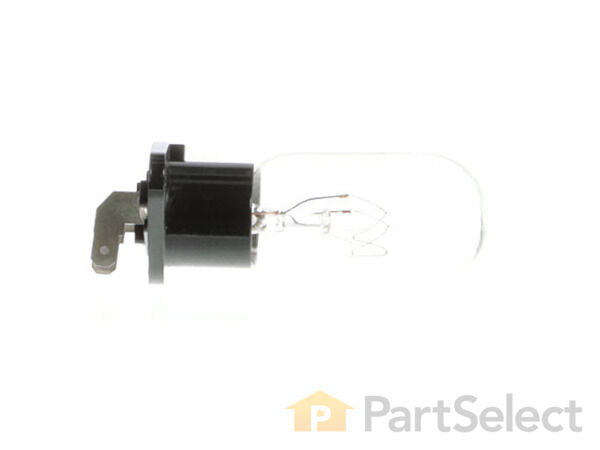
Light Bulb and Socket WB36X951

★★★★★
★★★★★
9 Reviews

Very Easy 

Less than 15 mins 

Rated by verified customers
$ Price Match
$ 29.95
  Special Order

Does this part fit my model?

Need help finding your model number?
PartSelect Number PS247776
Manufacturer Part Number WB36X951
Manufactured by GE for General Electric
Product Description

Light Bulb and Socket Specifications

This light bulb is sold with the socket. The bulb is 120V and 25W.
How Buying OEM Parts Can Save You Time and Money

How Buying OEM Parts Can Save You Time and Money

Why buy the real thing?

OEM stands for Original Equipment Manufacturer. Simply put, this means that the company who made your appliance is also supplying the replacement part for it.

  • OEM from PartSelect
  • Genuine brand name
  • Guaranteed to fit
  • Superior quality and durability
  • 1 year warranty
  • Generic
  • Unknown manufacturer
  • No fit guarantee
  • Inconsistent quality and lifespan
  • Limited warranty and support
You May Also Need ?
Troubleshooting
This part fixes the following symptoms:
  • Won’t turn on
This part works with the following products:
  • Microwave
Part# WB36X951 replaces these:
AP2029991, 260392
Back to Top
Customer Reviews
Average Rating:
★★★★★
★★★★★
9 Reviews
4.8
Filter By Rating:
  • 5 Stars
    7
  • 4 Stars
    2
  • 3 Stars
    0
  • 2 Stars
    0
  • 1 Star
    0
Sort by:
  • 1
Sorry, we couldn't find any existing reviews that matched. Try using some different or simpler keywords.
  • 1
Customer Repair Stories
 Average Repair Rating: 5.0 / 5.0, 5 reviews. What's this?
Sort by:
  • 1
Sorry, we couldn't find any existing installation instruction that matched.
light bulb burn out
removed 3 screws from back took cover off pulled out socket pulled off terminal replaced bulb then reverse order back together. all while unplugged.
  • Michael from LYNN, MA
  • Difficulty Level:
    Very Easy
  • Total Repair Time:
    Less than 15 mins
  • Tools:
    Screw drivers
1 person found this instruction helpful.
Was this instruction helpful to you?
Thank you for voting!
Door switch broke
Went on line and saw the Video - very simple to follow - very easy to remove and install the new switch -- went like a breeze!
  • J Theodore from RESTON, VA
  • Difficulty Level:
    Very Easy
  • Total Repair Time:
    Less than 15 mins
  • Tools:
    Screw drivers
1 person found this instruction helpful.
Was this instruction helpful to you?
Thank you for voting!
light burned out
removed 3 screws to take off outer housing ( did not have proper screw driver but was able to remove with pliers). used flat head screw driver to pry light socket w/bulb off of snap-in mounting & unplugged socket wire attachments. plugged in & reattached new part.
  • David from Pittsburgh, PA
  • Difficulty Level:
    Really Easy
  • Total Repair Time:
    Less than 15 mins
  • Tools:
    Pliers, Screw drivers
3 of 3 people found this instruction helpful.
Was this instruction helpful to you?
Thank you for voting!
Light burned out
I happen to have a set of "security" screw driver tips which are required for this appliance - available for about $10 at Home Depot or Harbor Freight. Remove three security screws from back of housing, lift up and aft to remove the cover. The light is on the left in a "snap in" mounting so use a flat blade screw driver to push back the retainer and lift out the old bulb then disconnect the two "push on" wires and install the new light. Total time about 10 minutes. The only issue is the requirement for a security driver set.
  • Jerry from CRAWFORDVILLE, FL
  • Difficulty Level:
    Very Easy
  • Total Repair Time:
    Less than 15 mins
6 of 7 people found this instruction helpful.
Was this instruction helpful to you?
Thank you for voting!
Original lamp burned out.
After looking up on the computer a schematic of the unit, all that was needed was removing four screws to remove the top and side cover which was one piece.
Next was removal of electrical connection to burned out lamp, then removing burned out lamp and installing the new lamp and reconnecting electrical connection.
Job was complete after reinstalling the cover.

Microwave now working with new lamp lighting when in use.
  • Rudy from Huntington, IN
  • Difficulty Level:
    Really Easy
  • Total Repair Time:
    15 - 30 mins
  • Tools:
    Screw drivers
73 of 89 people found this instruction helpful.
Was this instruction helpful to you?
Thank you for voting!
  • 1
Questions and Answers

Be the first to ask our experts a question about this part!

Model Cross Reference
This part works with the following models:
PartSelect Number: PS247776
Manufacturer Part Number: WB36X951
Brand
Model Number
Description
General Electric
JE1160B
Microwave - GE Microwave Model JE1160B Parts
General Electric
JE1160W
Microwave - GE Microwave Model JE1160W Parts
General Electric
JE2160B
Microwave - GE Microwave Model JE2160B Parts
General Electric
JE2160C
Microwave - GE Microwave Model JE2160C Parts
General Electric
JE2160S
Microwave - GE Microwave Model JE2160S Parts
General Electric
JE2160W
Microwave - GE Microwave Model JE2160W Parts
General Electric
JES1142S
Microwave - GE Microwave Model JES1142S Parts
General Electric
JES1288S
Microwave - GE Microwave Model JES1288S Parts
General Electric
JES1289S
Microwave - GE Microwave Model JES1289S Parts
General Electric
JES1290S
Microwave - GE Microwave Model JES1290S Parts
General Electric
JES1384S
Microwave - GE Microwave Model JES1384S Parts
General Electric
JES1384WDC001
Microwave
Customer Service Representative

Get in touch, we're here to help!

1-866-319-8402 Monday to Saturday
8am - 8pm EST

Contact Customer Service