Your coupon for will be reflected when you check out!
✖
Your coupon for
✖
Hello!
You're visiting the PartSelect site in U.S.
Would you like to shop on the Canadian site?
Stay on this site
Go to Canadian site
✖
Model Number Locations
1Select Category Type
Select Category Type
2Select Product Type
Select Product Type
3Select {MODEL} Type
Select {MODEL} Type
Sample Model Number Tags
Model numbers can be made up of numbers (1005400, for example) or a combination of letters and numbers (LAT1000AAE). The model number will most likely appear on either a paper sticker or a metal plate. Your appliance's model number tag may look similar to the sample model number tags shown here (model number highlighted in yellow):
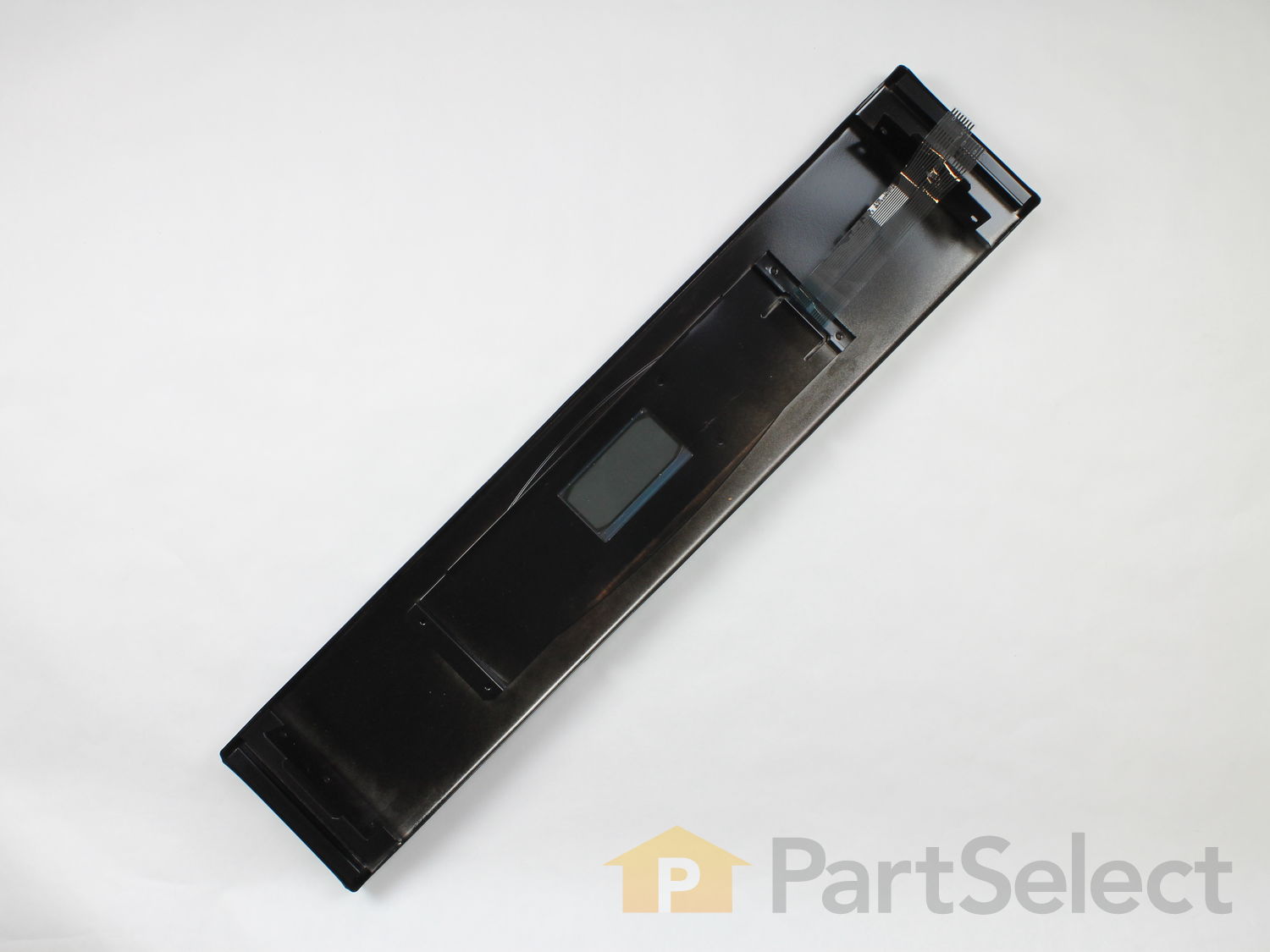
Introducing the Whirlpool Control Panel with Touchpad, a genuine OEM part perfect for enhancing your appliance's performance and functionality. This assembly is designed specifically for ranges to securely house selection buttons and display components enhancing your ease-of-use and cooking experience. Please remember to unplug your range before installing this top-notch part and use work gloves to keep your hands safe during the process. Suitable for various Whirlpool models, this control panel seamlessly fits to replace your existing part, improving your kitchen appliance's efficiency and longevity. Enjoy enhanced cooking control with the reliability of Whirlpool's high-quality construction in every use.
How Buying OEM Parts Can Save You Time and Money
Why buy the real thing?
OEM stands for Original Equipment Manufacturer. Simply put, this means that the company who made your appliance is also supplying the replacement part for it.
Keep searches simple. Use keywords, e.g. "leaking", "pump", "broken" or "fit".
Sorry, we couldn't find any existing reviews that matched. Try using some different or simpler keywords.
★★★★★
★★★★★
DONALD L - September 12, 2018
Verified Purchase
Very simple and quick
I just simply swapped out the old part with the new and...the family was elated to bake and broil again...I was a hero!
★★★★★
★★★★★
Kenneth C - March 26, 2019
Verified Purchase
New part fixed oven
Perfect fit. Hour or less to remove and install new part. Must be careful not the break control panel ribbon cables and connectors on repair.
★★★★★
★★★★★
Christopher N - February 16, 2019
Verified Purchase
Perfect Part, perfect customer service
The control panel I needed was identified immediately. Rapid shipping, it arrived in perfect condition. Easy to install, oven is up and running! An excellent example of how internet commerce is supposed to happen! Partselect.com rocks!
< Prev
1
Next >
Installation Instructions
Average Repair Rating: 4.1 / 5.0, 3 reviews.
What's this?
Sort by:
< Prev
1
Next >
Search filter:
Clear Filter
Your search term must have 3 or more characters.
Keep searches simple. Use keywords, e.g. "leaking", "pump", "broken" or "fit".
Sorry, we couldn't find any existing installation instruction that matched.
keys would not work
Removed power to oven, pulled the oven out, removed the four mounting bolts. removed control plastic ribbon cables. installed new control unit, installed ribbon cables restored power to oven then tested keypad, set clock, and reconnected oven to wall pandling.
alfred from forest hill, TX
Difficulty Level:
Really Easy
Total Repair Time:
Less than 15 mins
Tools:
Nutdriver, Screw drivers
25 of 34 peoplefound this instruction helpful.
Was this instruction helpful to you?
Thank you for voting!
Control Panel Buttons Not Working
Make sure oven is unplugged or breaker switch is OFF.
Pull the oven roughly 1/3 of the way out.
There are two bolt screws on each side of the control panel that become visible upon pulling the oven out. Remove these bolts with a nut driver.
Carefully pull the panel 180 degrees downward and being careful wi
... Read moreth the attached wiring. Unplug the two strip cables going into the control box by lifting up on the plastic holders.
Find the outer-most bolts, 2 on each side of the control panel innards, and remove them and then remove the entire control panel.
Remove the silver heat shielding from the old control panel and put it in the same way on the new one. Re-connect the two strip panel cables the same way it was connected, make sure everything else is still plugged in!
Re-bolt the the panel to the control box with the 4 outer screws.
Line up control panel and re-bolt the 4 outer-screws on the side of the oven
Gently push the oven back in place.
Cook brownies to celebrate!!
Read less
David from San Diego, CA
Difficulty Level:
Easy
Total Repair Time:
15 - 30 mins
Tools:
Nutdriver, Wrench set
9 of 11 peoplefound this instruction helpful.
Was this instruction helpful to you?
Thank you for voting!
Some of the control panel buttons did not respond
Disconect the oven, (electrically and the gas of the stovethat is on top) I removed the to cover of the oven. Remove the connectors of the eletronic circuit. Remove the whole panel by removing the 4 screws 2 each side.
Remove the electronic circuit (including the clock) and install it on the new panel. connect the flat circuit
... Read more cables that connect the front panel to the electronic circuit.
Assemble the panel to the oven. connect the harnesses. close the cover and screw it. reconect the stove (gass and electric).
Done!
Read less
Julio from Chula Vista, CA
Difficulty Level:
A Bit Difficult
Total Repair Time:
15 - 30 mins
Tools:
Screw drivers, Wrench set
3 of 3 peoplefound this instruction helpful.
Was this instruction helpful to you?
Thank you for voting!
< Prev
1
Next >
Questions and Answers
We're sorry, but our Q&A experts are temporarily unavailable.
Please check back later if you still haven't found the answer you need.
8 questions answered by our experts.
Sort by:
< Prev
1
Next >
Search filter:
Clear Filter
Your search term must have 3 or more characters.
Keep searches simple. Use keywords, e.g. "leaking", "pump", "broken" or "fit".
Sorry, we couldn't find any existing answers that matched.Try using some different or simpler keywords, or submit your new question by using the "Ask a Question" button above!
Mary
November 15, 2018
I new a white touchpad for our wall oven. All i am finding is black. Do you carry white and i just don't see it?
For model number MEW5530DDW
Hello Mary, thank you for your question. Unfortunately, the control panel touch pad is not available in white anymore. It only comes in black. I hope this helps!
1 person found this helpful.
Did this question help you?
Thank you for voting!
Roy
December 26, 2019
Where is the temperature sensor located? Roy
For model number MEW5530DDW
Hello Roy, Thank you for contacting us. I have researched the model you have provided and have found the part you are looking for is PartSelect Number PS1570174. There is a video on the site to show how to install the part and its location. Hope this helps!
The control panel on our oven, model i'd above, has failed. We ordered what we thought was correct replacement, but it wasnt wide enough. The paperwork invoice info was unfortunately mailed back with the part.What i need is the control panel that is 29.75 inches wide by 6.75 inches high. black color. i jotted down part number 5765m432-60 but i dont know if that is the correct width or the shorter one we initiate received (not from you folks...).
For model number Maytag Oven mee5530dbb
Hello Christopher, Thank you for contacting us. I am showing the correct part number is PS2357914. Good luck with your repair! Have a great day!
Did this question help you?
Thank you for voting!
KEN
March 12, 2019
Control panel with touchpad. All buttons dont work on pad.
For model number MEW5530DDS
Hi Ken,
Thank you for your question. If the buttons on the control panel are not working, check the connections between the control panel and the electronic control board to see if everything is fitted properly. You will need the test the control panel and the electronic control board to see which part is causing the issue. I hope this helps. Thank you and have a great day!
Did this question help you?
Thank you for voting!
Roger
July 1, 2019
Is it available in white?? thank you for your attention
For model number ps2357914
Hello Roger, thank you for writing. We would be happy to look into this, but we will need the model number for your appliance to do so. We look forward to hearing back from you.
Did this question help you?
Thank you for voting!
Loren
November 23, 2019
Several keypad numbers not working. Replaced control panel. Same issues occurred.
For model number MEW5530DDS
Hi Loren, at that point it is likely the control board PS10064576. Thank you for your question and good luck with your repair!
Addition to original question. Several control keys not working. Replaced control panel. Problem fixed. 13 months later, same problem returned. Replaced with new control panel. Problem not fixed.
For model number MEW5530DDS
Hi Loren, as best I can guess you would have to replace the control board. Thank you for your question and good luck with your repair!
I replaced the bottom element but the oven only heats with the top element.
For model number mew5530ddw
Hi Roy, thank you for your question. There are a few parts that could cause this issue in your appliance. The other part you should check would be your oven temperature sensor. That can also be tested with a multi meter and should be reading between 1000 - 1100 ohms. If those three parts are fine however, then the issue may be in your control board. I hope that helps. Good luck with your repair.
Did this question help you?
Thank you for voting!
< Prev
1
Next >
Model Cross Reference
This part works with the following models:
PartSelect Number: PS2357914
Manufacturer Part Number: 5765M432-60
Item is in stock and is estimated to be delivered in 2-3 business days via Standard Shipping.
On Order
Item is not in stock and usually ships 3-5 business days from the time you place your order.
Special Order
Item is not in stock and usually ships 10-15 business days from the time you place your order.
NLA - No Longer Available
This item is no longer being made by the manufacturer, and cannot be added to your shopping cart.
[{"position":0,"name":"Home","title":"Home","url":"/"},{"position":1,"name":"Circuit Board or Touch Pad","title":"Circuit Board or Touch Pad","url":"/Wall-Oven-Circuit-Boards-and-Touch-Pads.htm"},{"position":2,"name":"5765M432-60","title":"5765M432-60","url":""}]
You added 1 item to your cart
✖
% OFF
$
$
Qty:
Total item(s) in cart:
Order Subtotal
$
*Taxes and shipping will be applied during checkout