Your coupon for will be reflected when you check out!
✖
Your coupon for
✖
Hello!
You're visiting the PartSelect site in U.S.
Would you like to shop on the Canadian site?
Stay on this site
Go to Canadian site
✖
Model Number Locations
1Select Category Type
Select Category Type
2Select Product Type
Select Product Type
3Select {MODEL} Type
Select {MODEL} Type
Sample Model Number Tags
Model numbers can be made up of numbers (1005400, for example) or a combination of letters and numbers (LAT1000AAE). The model number will most likely appear on either a paper sticker or a metal plate. Your appliance's model number tag may look similar to the sample model number tags shown here (model number highlighted in yellow):
Is your refrigerator freezer in disarray? You're just one Whirlpool Lower Freezer Basket away from a more organized, efficient kitchen life. This authentic OEM part is designed to work seamlessly with a variety of Whirlpool models, helping you manage your food storage better. Why is this important? This lower basket is more than just a part; it's a solution to that jumbled freezer condition that keeps you searching for ingredients. Use it to sort, store and simplify your food organization. Installing it is simple too - your owner's manual will guide you through the process effortlessly. Just imagine your freezer, working like new, with a place for everything and everything in its place?this is what the Whirlpool Lower Freezer Basket can do for you. We trust in the durability and reliability of this part as it's made by Whirlpool, the appliance expert. Please note, like all the others, this part comes in specific size and shape. Before purchasing, make sure to double-check your model to ensure it's the perfect fit to solve your freezer organization problems.
How Buying OEM Parts Can Save You Time and Money
Why buy the real thing?
OEM stands for Original Equipment Manufacturer. Simply put, this means that the company who made your appliance is also supplying the replacement part for it.
Keep searches simple. Use keywords, e.g. "leaking", "pump", "broken" or "fit".
Sorry, we couldn't find any existing reviews that matched. Try using some different or simpler keywords.
★★★★★
★★★★★
Albert D - January 26, 2019
Verified Purchase
So far so good.
Only been a few weeks but is working great so far.
< Prev
1
Next >
Installation Instructions
Average Repair Rating: 2.8 / 5.0, 1 reviews.
What's this?
Sort by:
< Prev
1
Next >
Search filter:
Clear Filter
Your search term must have 3 or more characters.
Keep searches simple. Use keywords, e.g. "leaking", "pump", "broken" or "fit".
Sorry, we couldn't find any existing installation instruction that matched.
While preheating the oven would often shut off. After manually restarting preheat again, the temperature would slowly rise until it shut off again. After several restarts the oven came to the desired temperature. It would hold that temperature. Other functions seemed to work fine. I could either fix
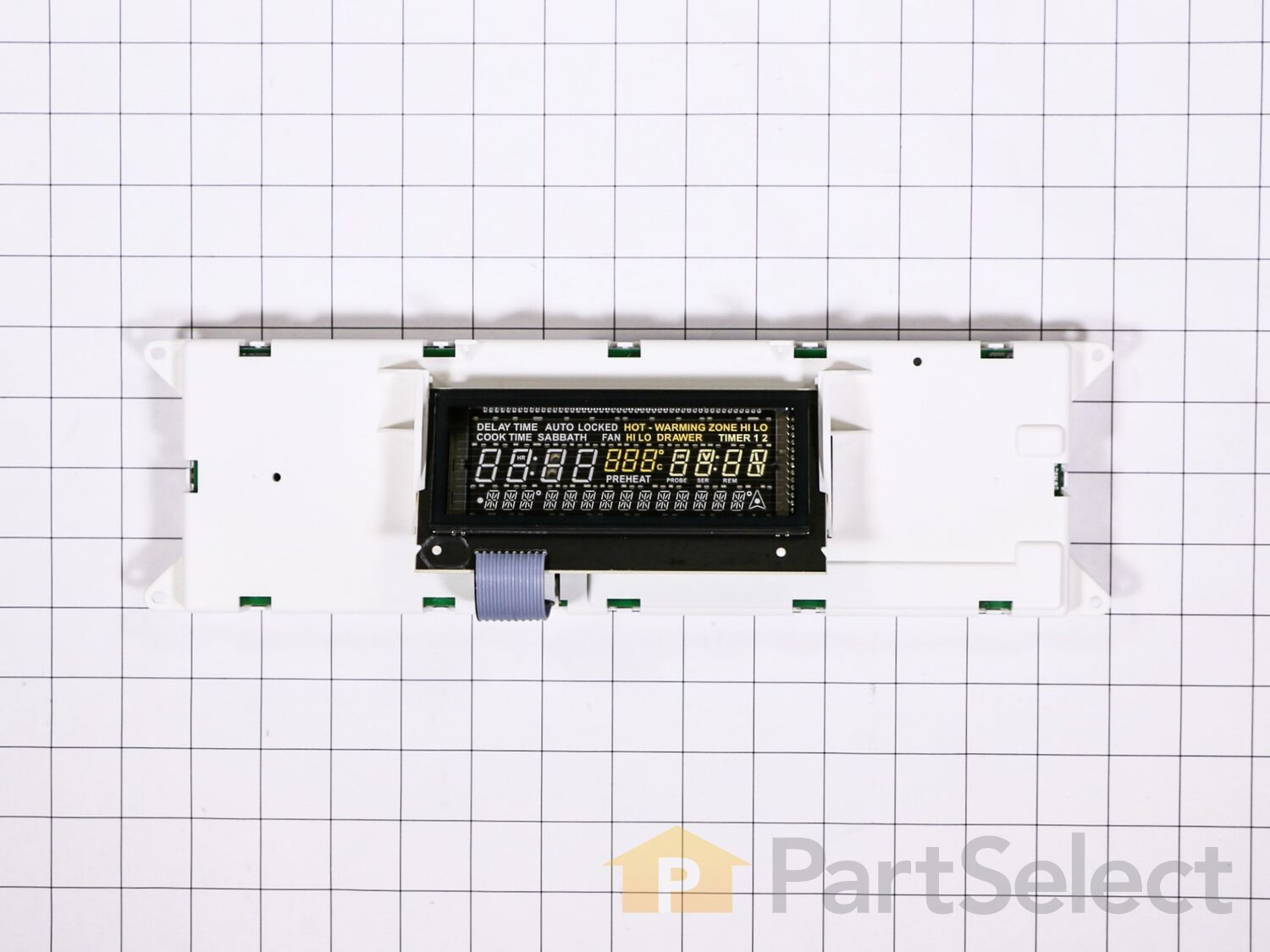
Shut off power to the range at the circuit breaker. Remove 2 Phillips screws at either end of the front panel on the L and R side. Open the oven door and remove 4 hex head screws under the panel. Lift up the panel and pull it forward gently. It slips out and hangs on all the wires connecting it to the stove. Unscrew the 4 Phillips screws
... Read more holding the control panel frame in place. Take pictures of the back of the control board that show clearly the position of the 11 plugs inserted in the board. Gently remove each of the plugs either by pinching open the connector or simply wiggling it out. Insert each plug into the new control panel. This is relatively easy, since the plugs are color coded, differently shaped, and held in the correct position by their wires. Nevertheless after finishing check compliance with the pictures you took. Screw the new panel in place with the 4 Phillips screws. Reinstall the panel, turn on the power, and reset the clock.
Read less
Dennis from DURHAM, NH
Difficulty Level:
A Bit Difficult
Total Repair Time:
30 - 60 mins
Tools:
Screw drivers, Socket set
1 personfound this instruction helpful.
Was this instruction helpful to you?
Thank you for voting!
< Prev
1
Next >
Questions and Answers
We're sorry, but our Q&A experts are temporarily unavailable.
Please check back later if you still haven't found the answer you need.
5 questions answered by our experts.
Sort by:
< Prev
1
Next >
Search filter:
Clear Filter
Your search term must have 3 or more characters.
Keep searches simple. Use keywords, e.g. "leaking", "pump", "broken" or "fit".
Sorry, we couldn't find any existing answers that matched.Try using some different or simpler keywords, or submit your new question by using the "Ask a Question" button above!
Daniela
September 24, 2019
The clock works but the control buttons for the over are not functioning
For model number JES8850BCS
Hello Daniela, Thank you for the question. If none of the buttons work, normally this means the board PartSelect Number PS11745977 is defective and will need to be replaced. You can check to make sure the harness from the touch pad to the board is not damaged and securely attached. Hope this helps!
3 people found this helpful.
Did this question help you?
Thank you for voting!
Dean
January 16, 2024
My Jenn Air range bake and broil features does not pre-heat anymore. However, the cooktop does and if I set the oven to rapid pre-heat it does slowly rise in temperature. The elements are fine and the touchpad reponds well. I have been told that I need to replace the control board. I want to confirm that I don't need any other part required to replace and any additional advice that you may have.
For model number JES8860CCS02
Hello Dean, thank you for reaching out. Based on our understanding of the issue, we would suggest checking the temperature sensor, part number PS1570174, before replacing the control board. We hope that helps!
Control panel says power loss. What part or parts do i need to fix?
For model number JES8850BAS
Good Day Bill. Thank you for your question in regards to your unit (Model Number JES8850BAS). Based on our research the part you may need to replace is PartSelect Number PS1570174. You can order this part either online at our website www.PartSelect.com or by calling us by phone at 888-260-4310. Best Regards.
1 person found this helpful.
Did this question help you?
Thank you for voting!
Sean
January 23, 2019
Oven does not heat in bake mode. Ohmed out both coils both are good. Got 220v to top coil when tested. Got 64v to lower coil when tested. Getting mixed info on websites. Some say control board. Some say control panel. Can you help? Thank you. Sean.
For model number JES8850CAS01
Hello Sean, Thank you for the question. It would be the control board,Part Number: PS11745977. The panel is just the front plastic panel that sits in front of the controls. Thank you for your inquiry, good luck with this repair!
Did this question help you?
Thank you for voting!
Jim
February 2, 2025
When I turn the oven on it preheats and then shuts off by itself. I reset the breaker and it will start to heat again only to shutoff by itself again. I can leave the power on and the clock display comes on and off by itself all day. I think it may be the circuit board. Any ideas?
For model number JES8850CAS01
Hello Jim, thank you for your question. Yes, it is an issue with the Electronic Clock Control Board PS11745977. Shut off power to the range at the circuit breaker. Remove 2 Phillips screws at either end of the front panel on the L and R side. Open the oven door and remove 4 hex head screws under the panel. Lift up the panel and pull it forward gently. It slips out and hangs on all the wires connecting it to the stove. Unscrew the 4 Phillips screws holding the control panel frame in place. Take pictures of the back of the control board that show clearly the position of the 11 plugs inserted in the board. Gently remove each of the plugs either by pinching open the connector or simply wiggling it out. Insert each plug into the new control panel. This is relatively easy, since the plugs are color coded, differently shaped, and held in the correct position by their wires. Nevertheless after finishing check compliance with the pictures you took. Screw the new panel in place with the 4 Phillips screws. Reinstall the panel, turn on the power, and reset the clock. We hope this helps.
Did this question help you?
Thank you for voting!
< Prev
1
Next >
Model Cross Reference
This part works with the following models:
PartSelect Number: PS11745977
Manufacturer Part Number: WP8507P226-60
Item is in stock and is estimated to be delivered in 2-3 business days via Standard Shipping.
On Order
Item is not in stock and usually ships 3-5 business days from the time you place your order.
Special Order
Item is not in stock and usually ships 10-15 business days from the time you place your order.
NLA - No Longer Available
This item is no longer being made by the manufacturer, and cannot be added to your shopping cart.
[{"position":0,"name":"Home","title":"Home","url":"/"},{"position":1,"name":"Range","title":"Range","url":"/Range-Parts.htm"},{"position":2,"name":"Circuit Board or Touch Pad","title":"Circuit Board or Touch Pad","url":"/Range-Circuit-Boards-and-Touch-Pads.htm"},{"position":3,"name":"WP8507P226-60","title":"WP8507P226-60","url":""}]
You added 1 item to your cart
✖
% OFF
$
$
Qty:
Total item(s) in cart:
Order Subtotal
$
*Taxes and shipping will be applied during checkout