



















EasyApplianceParts is now PartSelect! We've merged our sites to provide a better shopping experience for you.   Full Details
Back
Back
Back
Keep typing for more specific results...
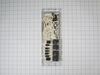
Part Location Diagram of WB27X25357 GE CONTROL BOARD
See part 16 in the diagram
( Grid squares measure 1x1 inch )
Customer Service Representative

Get in touch, we're here to help!

1-866-319-8402 Monday to Saturday
8am - 8pm EST

customerservice@partselect.com

CONTROL BOARD WB27X25357

A Bit Difficult 

1- 2 hours 

Rated by verified customers
$ Price Match
$ 181.54
  In Stock
Order now and your part arrives by Apr 30

Does this part fit my model?

PartSelect Number PS11700839
Manufacturer Part Number WB27X25357
Manufactured by GE for General Electric
Product Description

CONTROL BOARD Specifications

You're in luck?meet the Frigidaire Pan-deli, your perfect appliance repair companion. This isn't just a spare part?it's a crucial piece of the puzzle that can bring your appliance back to life and make it operate smoothly. Quality and durability come standard with this Pan-deli. It's made with precision so you don't have to worry about its performance. The best part? It's a part of the Frigidaire family, a brand you already know and trust. Hence, it's designed to help your appliance live longer and work better, saving you both time and money in the long run. The Frigidaire Pan-deli will make a noticeable difference in your daily appliance usage?think of it as a small upgrade with big benefits. Find out how this handy replacement part can enhance your appliance's efficiency and give it a new lease on life.
How Buying OEM Parts Can Save You Time and Money

How Buying OEM Parts Can Save You Time and Money

Why buy the real thing?

OEM stands for Original Equipment Manufacturer. Simply put, this means that the company who made your appliance is also supplying the replacement part for it.

  • OEM from PartSelect
  • Genuine brand name
  • Guaranteed to fit
  • Superior quality and durability
  • 1 year warranty
  • Generic
  • Unknown manufacturer
  • No fit guarantee
  • Inconsistent quality and lifespan
  • Limited warranty and support
You May Also Need ?
Troubleshooting
This part works with the following products:
  • Range
Part# WB27X25357 replaces these:
WB27X20869, WB27X21621
Back to Top
Installation Instructions
 Average Repair Rating: 2.5 / 5.0, 2 reviews. What's this?
Sort by:
  • 1
Sorry, we couldn't find any existing installation instruction that matched.
Oven not reaching desired temperature setting.
First tried new oven temperature sensor. No change. Ordered new electronic control board, #PS11700839
and new faceplate graphics, #PS8754650.
1. Applied faceplate graphics to control board.
2. Pulled out range, disconnected power and removed
both rear panel screws with 1/4" power nut driver.
3. LEAVING WIRES ATTACHED I removed the six
screws holding the old control board. I then left the
old control board dangling with the wires still
attached.
4. Installed the new control board with the six screws.
5. One by one, I removed a wire from the dangling old
control board to the new control board. Once all
wires were transferred I double-checked my work.
6. Reinstalled both rear panels and plugged in range.
7. Using two accurate oven thermometers I tested
various temperatures and found that the range
oven heated perfectly as per the setting chosen.
Other Parts Used:
CONTROL BOARD FACEPLATE GRAPHICS (DG)
  • Thomas from NAMPA, ID
  • Difficulty Level:
    A Bit Difficult
  • Total Repair Time:
    1- 2 hours
  • Tools:
    Nutdriver
1 person found this instruction helpful.
Was this instruction helpful to you?
Thank you for voting!
Discrepancy between preheat temperature indicator and actual temperature
Pulled the range out and unplugged it. Removed the back of the oven covering the control board. (watched a you-tube video of a similar oven to get basics of how to do it). disconnected the wiring connections and transferred them to the new control board as I removed them. Removed the screws (4) holding the brackets that held the control board in place and removed the board. Had to remove the control board covering that identified what the controls were by carefully and slowly pulling it off as to not crack or break it. Pressed it back onto the new control board. Then reversed the process to re-install it. Once it was back in place I replaced the back covering of the range that I had removed. Plugged the range in and tried out the controls to make sure everything worked.
  • Sharon from SHELL LAKE, WI
  • Difficulty Level:
    A Bit Difficult
  • Total Repair Time:
    30 - 60 mins
  • Tools:
    Nutdriver, Pliers, Socket set
1 person found this instruction helpful.
Was this instruction helpful to you?
Thank you for voting!
  • 1
Questions and Answers

We're sorry, but our Q&A experts are temporarily unavailable.
Please check back later if you still haven't found the answer you need.

1 question answered by our experts.
Sort by:
  • 1
Sorry, we couldn't find any existing answers that matched.Try using some different or simpler keywords, or submit your new question by using the "Ask a Question" button above!
Terry
December 28, 2024
I am getting error code F20 and F 31. Nothing will work stove just beeps and shows this error code. What parts would I need?
For model number JB750EF4Es
PartSelect logo
Hello Terry, thank you for getting in touch. Based on our research, the error code F20 indicates that the oven temperature has exceeded a preset threshold, and the error code F31 indicates that the control board detects the oven temperature probe circuit is shorted. We would recommend checking the wire harness regarding the temperature sensor first. If the wiring is intact, then you may need to check the temperature sensor, part number PS10059162, to solve the problem. We hope this helps.

Did this question help you?
Thank you for voting!
Related Parts:
  • 1
Model Cross Reference
This part works with the following models:
PartSelect Number: PS11700839
Manufacturer Part Number: WB27X25357
Brand
Model Number
Description
General Electric
JB740DF1BB
Range
General Electric
JB740DF1WW
Range
General Electric
JB740DF2BB
Range - ELECTRIC RANGE
General Electric
JB740DF2WW
Range - ELECTRIC RANGE
General Electric
JB740SF1SS
Range
General Electric
JB740SF2SS
Range - ELECTRIC RANGE
General Electric
JB745DF1BB
Range
General Electric
JB745DF1WW
Range
General Electric
JB745DF2BB
Range - ELECTRIC RANGE
General Electric
JB745DF2WW
Range - ELECTRIC RANGE
General Electric
JB745DF3BB
Range - ELECTRIC RANGE
General Electric
JB745DF3WW
Range - ELECTRIC RANGE
General Electric
JB745EF1ES
Range
General Electric
JB745EF2ES
Range - ELECTRIC RANGE
General Electric
JB745EF3ES
Range - ELECTRIC RANGE
General Electric
JB745SF1SS
Range
General Electric
JB745SF2SS
Range - ELECTRIC RANGE
General Electric
JB745SF3SS
Range - ELECTRIC RANGE
General Electric
JB750DF1BB
Range
General Electric
JB750DF1CC
Range
General Electric
JB750DF1WW
Range
General Electric
JB750DF2BB
Range - ELECTRIC RANGE
General Electric
JB750DF2CC
Range - ELECTRIC RANGE
General Electric
JB750DF2WW
Range - ELECTRIC RANGE
General Electric
JB750DF3BB
Range - ELECTRIC RANGE
General Electric
JB750DF3CC
Range - ELECTRIC RANGE
General Electric
JB750DF3WW
Range - ELECTRIC RANGE
General Electric
JB750DF4BB
Range - ELECTRIC RANGE
General Electric
JB750DF4CC
Range - ELECTRIC RANGE
General Electric
JB750DF4WW
Range - ELECTRIC RANGE
Customer Service Representative

Get in touch, we're here to help!

1-866-319-8402 Monday to Saturday
8am - 8pm EST

Contact Customer Service