















RK767G1D2 Hotpoint Range - Instructions
Keep searches simple. Use keywords, e.g. "leaking", "pump", "broken" or "fit".
timer knobs missing
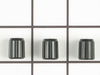
Just pushed the new timer knobs onto the stem. They fit and now I can set the oven timer without having to use a pair of pliers to grip the stem and turn it.
Two of the knobs fit perfectly.
The stem for the the clock was broken off and there was not enough of the stem left for the new knob to fit.
Two of the knobs fit perfectly.
The stem for the the clock was broken off and there was not enough of the stem left for the new knob to fit.
Parts Used:
-
Doris from Redwood City, CA
-
Difficulty Level:Really Easy
-
Total Repair Time:Less than 15 mins
5 of 11 people
found this instruction helpful.
Was this instruction helpful to you?
Thank you for voting!
Gasket Tear - Needed Replacing
Once I saw the gasket that was supplied it was really easy to see how to install it.
A hook on either end of the gasket gave me the clue on how to remove the old one.
Off with the old and on with the new in less than 2 minutes!!
Extremely easy!! Thanks Part Select for having what I needed!
A hook on either end of the gasket gave me the clue on how to remove the old one.
Off with the old and on with the new in less than 2 minutes!!
Extremely easy!! Thanks Part Select for having what I needed!
Parts Used:

-
Kathy from Cupertino, CA
-
Difficulty Level:Really Easy
-
Total Repair Time:Less than 15 mins
2 of 2 people
found this instruction helpful.
Was this instruction helpful to you?
Thank you for voting!
Bake element failed
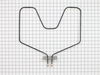
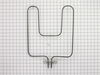
Took out old one and replaced with new one. The only problem I had was my arms were not quite long enough. I had to climb into the oven to get to the electrical connection.
Parts Used:
-
William J from SALISBURY, MD
-
Difficulty Level:A Bit Difficult
-
Total Repair Time:1- 2 hours
-
Tools:Socket set
2 of 3 people
found this instruction helpful.
Was this instruction helpful to you?
Thank you for voting!
Oven Heating element broken
Turned off power to the oven at the circuit breaker. Pulled the old heating element from the back lower wall of the oven. Noted the position of the wires (right terminal attached to the red wire, left to the black wire). Removed small bolts holding the element to the wires using pliers. Attached the new element using screw driver. New element came with screws, not bolts. Pushed the element back into place and restored power. Tested to make sure everything worked. Everything works and I ran an oven cleaning cycle. Noticed that indicator light above the temperature selctor is always on now even when oven is in the OFF position. Not sure if that's related to the change or to the oven cleaning cycle I ran. In any case, oven seems to work normally.
Parts Used:
-
James from Hanover, MA
-
Difficulty Level:Really Easy
-
Total Repair Time:Less than 15 mins
-
Tools:Pliers, Screw drivers
2 of 3 people
found this instruction helpful.
Was this instruction helpful to you?
Thank you for voting!
element burned out
Took off the door, took out the two screws in the back of the element. Then pulled the element forward, then removed the two wires. Then put it all back together with the new element.
Parts Used:
-
Jeff from Westport, IN
-
Difficulty Level:Really Easy
-
Total Repair Time:Less than 15 mins
-
Tools:Nutdriver, Screw drivers
2 of 3 people
found this instruction helpful.
Was this instruction helpful to you?
Thank you for voting!
Bake element burned out
Turned off power. Then loosened two nuts at back of oven. Pulled out old element and inserted new element. Tightened two nuts and turned power back on.
Parts Used:
-
JoAnn from RICHARDSON, TX
-
Difficulty Level:Very Easy
-
Total Repair Time:15 - 30 mins
-
Tools:Pliers, Wrench (Adjustable)
2 of 3 people
found this instruction helpful.
Was this instruction helpful to you?
Thank you for voting!
Oven wouldn't hold temp - over/under
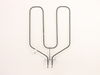
Unplugged the range, took old elements out, put new ones in. Couldn't have been easier and for the total cost of about $60; I have a working oven again. A LOT cheaper than a new $600 range!!
Parts Used:
-
Andor from Oxford, OH
-
Difficulty Level:A Bit Difficult
-
Total Repair Time:30 - 60 mins
-
Tools:Screw drivers, Socket set
2 of 3 people
found this instruction helpful.
Was this instruction helpful to you?
Thank you for voting!
Simple, unscrew and then re-screw
-
Carol from Evergreen Park, IL
-
Difficulty Level:Really Easy
-
Total Repair Time:15 - 30 mins
-
Tools:Screw drivers
2 of 3 people
found this instruction helpful.
Was this instruction helpful to you?
Thank you for voting!
element went out on oven
Made sure oven was turned off. I used nut driver to remove nuts holding old element to back of oven. gently pulled element out of wall, taking care not to yank because of wires attached to back of element. Made sure oven was off again and then used nut driver to carefully remove wire leads from receptors on element. removed old element from oven and got the new element. carefully used nut driver to attach wire leads to new element. When snugging the bolts to leads, used pliers to keep leads on the element from bending. carefully replaced wires and rear of element into the space behind oven, and used nut driver to attach the back of element to the back of oven. shut oven and turned on to make sure it worked. it did. I was very pleased with my experience with part select dot com, and will be buying another element soon to replace the one in my other oven! Thank you
Parts Used:
-
Brian from Deer Park, TX
-
Difficulty Level:Really Easy
-
Total Repair Time:Less than 15 mins
-
Tools:Nutdriver, Pliers
1 person
found this instruction helpful.
Was this instruction helpful to you?
Thank you for voting!
Bake element burned out
Removed 4 scews from old element and replaced the old element with the new element with the supplyed new screws. It was very easy. The new element works great.
Parts Used:
-
Bill from Yucca Valley, CA
-
Difficulty Level:Really Easy
-
Total Repair Time:Less than 15 mins
-
Tools:Nutdriver, Screw drivers
1 person
found this instruction helpful.
Was this instruction helpful to you?
Thank you for voting!
Replace Bake Element
I removed the two screws that held the element in place. I pulled out the element and disconnected the two wires and unscrewed the screws and then place the new element to it. screwed the wires back to the element wires and then push it back in. Replaced the outside plate and screw the two screws back in.
Save myself money by doing it myself.
Save myself money by doing it myself.
Parts Used:
-
Fernande from Newmarket, NH
-
Difficulty Level:Really Easy
-
Total Repair Time:1- 2 hours
-
Tools:Screw drivers
1 person
found this instruction helpful.
Was this instruction helpful to you?
Thank you for voting!
bake element no heat
-
larry from buckhannon, WV
-
Difficulty Level:Really Easy
-
Total Repair Time:15 - 30 mins
-
Tools:Nutdriver, Pliers
1 person
found this instruction helpful.
Was this instruction helpful to you?
Thank you for voting!
Bake Element didn't heat sufficiently
Turned off circuit breaker, took two screws out to be able to pull element out from back. Took two more screws out to remove old element from oven. Did the opposite to install the new bake element. Turned power back on, and it worked fine.
Parts Used:
-
Wayne from Mount Laurel, NJ
-
Difficulty Level:Easy
-
Total Repair Time:15 - 30 mins
-
Tools:Screw drivers
1 person
found this instruction helpful.
Was this instruction helpful to you?
Thank you for voting!
The bottom oven heat element didn't work
1. Removed the old element. Had a little trouble loosening the screws. After we got them loose, everything was easy.
2. Pulled out the element and disconnected the wires.
3. Connected the wires on the new element.
4. Screwed the element back in.
5. Connected the stove and turned on the oven.
6. It works like a new one.
2. Pulled out the element and disconnected the wires.
3. Connected the wires on the new element.
4. Screwed the element back in.
5. Connected the stove and turned on the oven.
6. It works like a new one.
Parts Used:
-
Marilee from Newburgh, IN
-
Difficulty Level:Easy
-
Total Repair Time:15 - 30 mins
-
Tools:Pliers, Socket set
1 person
found this instruction helpful.
Was this instruction helpful to you?
Thank you for voting!
Bad Bake unit
Had my youngest son removed the two nut screws that held the element in place. I then pulled the element out about 3 inches and disconnected the two wires. Removed element and installed new element in reverse order.
Parts Used:
-
John from Grand Blanc, MI
-
Difficulty Level:Really Easy
-
Total Repair Time:15 - 30 mins
-
Tools:Nutdriver, Screw drivers
1 person
found this instruction helpful.
Was this instruction helpful to you?
Thank you for voting!