















KECC507RSS02 KitchenAid Cooktop - Instructions
Keep searches simple. Use keywords, e.g. "leaking", "pump", "broken" or "fit".
"Hot burner" Light always On
It's easier with two people.
1 - Turn the breaker for the range to OFF
2 - Verify power is off by testing the burners and lights
3 - Remove front two screws above oven door jamb
4 - Lift the top and prop it up with the spoon, or have your helper hold it.
5 - Loosen the screw at the rear of the bracket that holds the elements against the glass top (front and rear are held by the same retainer)
6 - Remove the bad element by sliding it sideways from the retainer. Do not disconnect things yet.
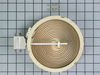
7 - The burner has numbers around the edge. Move brackets from old element to new one, matching the numbers. Then move wiring to new element. New burner may have a single connector where old one had 2 and a jumper. If so, ignore jumper.
8 - Slide new element under bracket and reinstall the screw.
9 - Lower the range top and re-install the screws.
10 - Turn on power and test.
1 - Turn the breaker for the range to OFF
2 - Verify power is off by testing the burners and lights
3 - Remove front two screws above oven door jamb
4 - Lift the top and prop it up with the spoon, or have your helper hold it.
5 - Loosen the screw at the rear of the bracket that holds the elements against the glass top (front and rear are held by the same retainer)
6 - Remove the bad element by sliding it sideways from the retainer. Do not disconnect things yet.
7 - The burner has numbers around the edge. Move brackets from old element to new one, matching the numbers. Then move wiring to new element. New burner may have a single connector where old one had 2 and a jumper. If so, ignore jumper.
8 - Slide new element under bracket and reinstall the screw.
9 - Lower the range top and re-install the screws.
10 - Turn on power and test.
Parts Used:
-
Stephanie from Phoenix, AZ
-
Difficulty Level:Easy
-
Total Repair Time:15 - 30 mins
-
Tools:Screw drivers
Was this instruction helpful to you?
Thank you for voting!