















KBSD618ESS01 KitchenAid Refrigerator - Instructions
Keep searches simple. Use keywords, e.g. "leaking", "pump", "broken" or "fit".
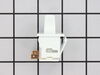
Light switch broke off
We looked up the problem online with the model number of the refrigerator. We ordered the part and followed the video installation that was sent with the order and was found online prior to purchasing
Parts Used:
-
Kathy from TEMECULA, CA
-
Difficulty Level:Very Easy
-
Total Repair Time:Less than 15 mins
-
Tools:Pliers
1 of 2 people
found this instruction helpful.
Was this instruction helpful to you?
Thank you for voting!
Ice was made intermittently, and then no ice at all!
My ice maker about six months ago started to ice make very intermittently and eventually stopped all together. The emiitter no matter what I did was giving me two flashes then a pause, over and over again. I purchased the emitter kit and with a Phillips screwdriver in about five minutes my ice maker kicked the sulinoid on and ice was already started!!! Fast and easy repair!!!
Parts Used:

-
Adam from West Valley City, UT
-
Difficulty Level:Really Easy
-
Total Repair Time:Less than 15 mins
-
Tools:Screw drivers
1 of 2 people
found this instruction helpful.
Was this instruction helpful to you?
Thank you for voting!
icemaker not working
Did not have elec. schematics or instructions, thought the problem may be the emitter/receiver. Ordered these parts, and included in the package were instructions for testing the e/m bd. Followed instructions for testing the e/m and determined the e/m was OK. Did not remove the boards from the box. Checked the internet and found schematic for the ice maker, tested and determined the ice maker was faulty. Problem solved.
Parts Used:
-
j from mc gaheysville, VA
-
Difficulty Level:A Bit Difficult
-
Total Repair Time:1- 2 hours
-
Tools:Nutdriver
1 of 3 people
found this instruction helpful.
Was this instruction helpful to you?
Thank you for voting!
Ice maker not refilling
1) unplug the refrigerator
2) remove the cover plate for the sensor board on your left facing the refrigerator
3) unplug the sensor board then remove the board from the cover plate.
4) install the new board onto the cover plate and
reinstall the board in to left side of the freezer compartment.
5) repeat this proces for the right side of the freezer compartment.
The two boards are very different and you will have no problem telling the difference between them.
6)Plug the refigerator back in and observe the red indicator light on the right hand side of the freezer compartment (it should be blinking) . Then hold down the flap on the left hand side and the blinking red light should go solid on. If it hasn't you have another problem with the ice maker.
2) remove the cover plate for the sensor board on your left facing the refrigerator
3) unplug the sensor board then remove the board from the cover plate.
4) install the new board onto the cover plate and
reinstall the board in to left side of the freezer compartment.
5) repeat this proces for the right side of the freezer compartment.
The two boards are very different and you will have no problem telling the difference between them.
6)Plug the refigerator back in and observe the red indicator light on the right hand side of the freezer compartment (it should be blinking) . Then hold down the flap on the left hand side and the blinking red light should go solid on. If it hasn't you have another problem with the ice maker.
Parts Used:
-
Kenneth from Scott, LA
-
Difficulty Level:Really Easy
-
Total Repair Time:15 - 30 mins
-
Tools:Screw drivers, Socket set
1 of 3 people
found this instruction helpful.
Was this instruction helpful to you?
Thank you for voting!
dirty filter
pulled oil filter out put new one in maybe 10 minutes
Parts Used:
-
Sherman from DSRT HOT SPGS, CA
-
Difficulty Level:Very Easy
-
Total Repair Time:Less than 15 mins
1 of 3 people
found this instruction helpful.
Was this instruction helpful to you?
Thank you for voting!
Light in my refrigerator didn't work.
At first I went to a local part supplier and they didn't have it in stock but could order it for me for $55.00 plus $10.00 to ship it. I told them I would have to think about it. I went home and got on the computer and found your web site and was I shocked when I saw the same part listed for $6.98 and $7.00 to ship it. You guys saved me $50.00. The part arrived in two day and took 5 min. to install. I now have light in my refrigerator. Thank you.
Parts Used:
-
Joseph from Byron Center, MI
-
Difficulty Level:Really Easy
-
Total Repair Time:Less than 15 mins
-
Tools:Screw drivers
1 of 3 people
found this instruction helpful.
Was this instruction helpful to you?
Thank you for voting!
Ice maker wouldn't fill with water to make ice.
Removed the screws and disconnected the part from the base. Attached the new part to the base and screwed back in. No big deal!!!!
Parts Used:
-
TJ from Jasper, GA
-
Difficulty Level:Really Easy
-
Total Repair Time:Less than 15 mins
-
Tools:Screw drivers
0 of 1 people
found this instruction helpful.
Was this instruction helpful to you?
Thank you for voting!
Ice maker was not producing ice.
I removed the receiver cover and replaced the board (three screws, two on the board) did the exact same procedure on the emitter board ( three on the cover, one on the board). This process took all of 4 minutes.
Parts Used:
-
Terry from Avondale, AZ
-
Difficulty Level:Really Easy
-
Total Repair Time:Less than 15 mins
-
Tools:Screw drivers
0 of 1 people
found this instruction helpful.
Was this instruction helpful to you?
Thank you for voting!
No ice was being made
After reading other repair stories online, i ordered the parts, followed the included instructions to replace the boards and the next day i had a full bin of ice. This is the second refrigerator i fixed with parts from partsselect.com. They are AWESOME!
Parts Used:
-
Stephen from Chicago, IL
-
Difficulty Level:Really Easy
-
Total Repair Time:Less than 15 mins
-
Tools:Screw drivers
0 of 1 people
found this instruction helpful.
Was this instruction helpful to you?
Thank you for voting!
Ice maker would not stop making ice.
Unplugged unit. Taped ice maker flap up and out of way. Removed screws holding emitter board, unplugged old board and connected new. Did same for receiver board on opposite side.
Parts Used:
-
THOMAS C from LAFAYETTE, LA
-
Difficulty Level:Really Easy
-
Total Repair Time:Less than 15 mins
-
Tools:Screw drivers
0 of 1 people
found this instruction helpful.
Was this instruction helpful to you?
Thank you for voting!
The icemaker would not work
I tried several things first : changed the filter cartridge, then the water control valve, then the control boards but still no ice. Rather than buy a new motor assembly, I bought a whole new icemaker which included the motor assembly and finally SUCCESS! In total it cost me about $350 but you have to try the easier and cheaper things first. One 1/4" screw and disconnecting the wire harness clip plus reusing the old icemaker base and the repair was complete. I would recommend a more detailed discussion on what each part does and the way the colored wires attach. Wire clips can sometimes be connected upside down. I was very happy with how quickly I received the new part. I whole-heartedly recommend PartSelect.
Parts Used:
-
Rick from Lorain, OH
-
Difficulty Level:Really Easy
-
Total Repair Time:Less than 15 mins
-
Tools:Nutdriver, Screw drivers, Wrench (Adjustable)
0 of 1 people
found this instruction helpful.
Was this instruction helpful to you?
Thank you for voting!
Ice Maker would not stop making ice.
Unplugged electrical cord for refrigerator, Removed the 3-screws for the bad Emitter, unplugged the wiring harness, plugged the wiring harness into the new Emitter put into position replaced screws, Removed screws for bad Receiver unplugged wiring harness, plugged in new receiver put into position replaced screws plugged refrigerator electrical cord back in. Working ok.
Parts Used:
-
Mark from Georgetown, TX
-
Difficulty Level:Really Easy
-
Total Repair Time:Less than 15 mins
-
Tools:Screw drivers
0 of 1 people
found this instruction helpful.
Was this instruction helpful to you?
Thank you for voting!
light would work intermitently
removed the 2 screws that held the panel in place, had to reach up and push on locking tabs to lower trhe front of the panel. was able to then push on the locking tab of the switch to release it. removed the wires, replaced them onto the new switch, and snapped the switch into place. the rest was reverse of the uninstall process.
Parts Used:
-
Gregory from middle island, NY
-
Difficulty Level:Easy
-
Total Repair Time:Less than 15 mins
-
Tools:Screw drivers
0 of 1 people
found this instruction helpful.
Was this instruction helpful to you?
Thank you for voting!
Sensor board on icemaker
First I removed the icemaker and the sensor boards by removing 6/7 screws. Next, I placed the new sensors into the emitter and receiver and re-installed the components...reset the icemaker and was all done!
Last time my icemaker broke I paid a contractor $225! This time I did it myself in 30 minutes and saved $150. And it was so easy my wife could'a done it......
Last time my icemaker broke I paid a contractor $225! This time I did it myself in 30 minutes and saved $150. And it was so easy my wife could'a done it......
Parts Used:
-
William from Margate, FL
-
Difficulty Level:Easy
-
Total Repair Time:30 - 60 mins
-
Tools:Nutdriver, Screw drivers
0 of 1 people
found this instruction helpful.
Was this instruction helpful to you?
Thank you for voting!
ice maker wouldn't stop making Ice then quit 1.5 days later
removed 3 screws on each side of freezer where the ice maker controls are unplugged the circuit boards. un screwed the boards from the plastic and put the new ones in, reinstalled. now, Ice and not over flowing! :)
Parts Used:
-
Juan from Tomball, TX
-
Difficulty Level:Really Easy
-
Total Repair Time:15 - 30 mins
-
Tools:Screw drivers
0 of 1 people
found this instruction helpful.
Was this instruction helpful to you?
Thank you for voting!