















JM9709 General Electric Range - Instructions
Keep searches simple. Use keywords, e.g. "leaking", "pump", "broken" or "fit".
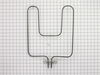
25 year old bake element
Bake element was getting old, thin and burning hotter in various spots. Ordered new part. Upon arrival, turned off power in the fuse box, 2 screws removed the old bake element from wall of oven. 2 more screws disconnected the power supply. Installed new part, reconnected all 4 screws and turned power back on. Entire job took 15-30 minutes, extremely easy.
Parts Used:
-
RICHARD from Island Lake, IL
-
Difficulty Level:Really Easy
-
Total Repair Time:15 - 30 mins
-
Tools:Screw drivers, Socket set
1 person
found this instruction helpful.
Was this instruction helpful to you?
Thank you for voting!
Melted cheese dripped onto element and it burned through element causing it to fail.
Turned off power to oven and removed screws attaching element to back of oven with a socket wrench. After removing the screws, I pulled element out about six inches and used a screw driver to remove the screws that attached the two electrical wires to the end prongs of the element. After removing old element, I simply reversed the process to install the new element.
Parts Used:
-
William from Kingwood, TX
-
Difficulty Level:Easy
-
Total Repair Time:15 - 30 mins
-
Tools:Screw drivers, Socket set
1 person
found this instruction helpful.
Was this instruction helpful to you?
Thank you for voting!
Replaced baking element
First of all I would like to praise PartSelect.
I ordered the part Friday afternoon and it was delivered the next day (Saturday) I couldn't believe it, because I chose the cheapest shipping, probably had something to do with it coming from in state.
First MAKE SURE BREAKER IS OFF, unscrew the old element from the inside of the oven and pulled it out and then unscrew the connection piece,(make sure wires don't fall back through hole once disconnected) re-screwed the new element to the connection pushed it back through the hole and then re-screwed the mount to the inside of the oven. It was that simple by far the easiest home repair I have ever done and I'm a 52 year old women.
Praying before always helps too.
I ordered the part Friday afternoon and it was delivered the next day (Saturday) I couldn't believe it, because I chose the cheapest shipping, probably had something to do with it coming from in state.
First MAKE SURE BREAKER IS OFF, unscrew the old element from the inside of the oven and pulled it out and then unscrew the connection piece,(make sure wires don't fall back through hole once disconnected) re-screwed the new element to the connection pushed it back through the hole and then re-screwed the mount to the inside of the oven. It was that simple by far the easiest home repair I have ever done and I'm a 52 year old women.
Praying before always helps too.
Parts Used:
-
Kathy from Fort Lauderdale, FL
-
Difficulty Level:Really Easy
-
Total Repair Time:15 - 30 mins
-
Tools:Screw drivers, Socket set
1 person
found this instruction helpful.
Was this instruction helpful to you?
Thank you for voting!
Oven wouldn't heat
First I removed the two srews that hold the element in place. I then pulled the element out about three inches and disconnected the two wires. I attached the wires to the new element and we had our oven working again. I really am happy with the timely service I received from PartSelect and would recommend them to anyone.
Parts Used:
-
Donald from Steubenville, OH
-
Difficulty Level:Really Easy
-
Total Repair Time:15 - 30 mins
-
Tools:Screw drivers
1 person
found this instruction helpful.
Was this instruction helpful to you?
Thank you for voting!
Baking element went out
I removed the two screws that held the element panel on. I removed the lead wires from the element, making sure the wires didn't retract back into the wall. I put the new element in, reconnected the lead wires and put the screws back in. I was concerned that the panel wasn't as long (top to bottom) as the previous one and it barely covered the hole, but it works fine. It would have cost me $60 to have it done by my home warranty company so I saved almost half.
Parts Used:
-
Jacqueline from Dallas, TX
-
Difficulty Level:Really Easy
-
Total Repair Time:15 - 30 mins
-
Tools:Screw drivers
1 person
found this instruction helpful.
Was this instruction helpful to you?
Thank you for voting!
Oven heat was very uneven.
I removed the screws that held the element in place. This was the most difficult part because clearance was tight between the screws and the element. I gently pulled the element out enough to expose the wire connections. I disconnected the wires and removed the element. Installation was the reverse - connect the wires, re-position the element, re-install the final screws.
Parts Used:
-
Scott from Northborough, MA
-
Difficulty Level:Really Easy
-
Total Repair Time:15 - 30 mins
-
Tools:Screw drivers, Socket set
1 person
found this instruction helpful.
Was this instruction helpful to you?
Thank you for voting!
The oven was not reaching the desired temperature
If the bottom heating element is not glowing red when you turn the oven on replacing this part may be the answer. Look for a spot on the old element that could indicate it has shorted out and no longer carries a charge.
Very simple to remove the two screws holding the element in place, pull the element out about 3 inches, disconnect the two wires, replace with the new element and reattach the two screws. Simple and effective. The new element is fast and responsive. Do this before any other suggestions to replace more complicated parts in the thermostate etc.
Very simple to remove the two screws holding the element in place, pull the element out about 3 inches, disconnect the two wires, replace with the new element and reattach the two screws. Simple and effective. The new element is fast and responsive. Do this before any other suggestions to replace more complicated parts in the thermostate etc.
Parts Used:
-
Richard from Arlington, TX
-
Difficulty Level:Really Easy
-
Total Repair Time:Less than 15 mins
-
Tools:Screw drivers
2 of 4 people
found this instruction helpful.
Was this instruction helpful to you?
Thank you for voting!
Bake element burned out
Removed 4 scews from old element and replaced the old element with the new element with the supplyed new screws. It was very easy. The new element works great.
Parts Used:
-
Bill from Yucca Valley, CA
-
Difficulty Level:Really Easy
-
Total Repair Time:Less than 15 mins
-
Tools:Nutdriver, Screw drivers
1 person
found this instruction helpful.
Was this instruction helpful to you?
Thank you for voting!
burned out element
remove 2 screws holding element to oven back wall/ unscrew wires from element/ new element install the reverse of removal
Parts Used:
-
david from woodbury, CT
-
Difficulty Level:Really Easy
-
Total Repair Time:Less than 15 mins
-
Tools:Screw drivers, Socket set
1 person
found this instruction helpful.
Was this instruction helpful to you?
Thank you for voting!
Bake element failed (broke in two)
Used a nut driver to remove two hex screws holding element to the back of the oven and then the two hex screws connecting the element to the oven wires. I pulled the element out and reversed the process. I turned the oven on and made sure the element worked.
Parts Used:
-
Gilda from Newport News, VA
-
Difficulty Level:Really Easy
-
Total Repair Time:Less than 15 mins
-
Tools:Nutdriver
1 person
found this instruction helpful.
Was this instruction helpful to you?
Thank you for voting!
Oven wouldn't heat
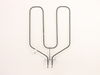
First I shut off the circuit breaker for the oven then removed the screws that hold the element in place. The element was pulled out about 3 inches and unscrewed the 2 screws to disconnect the two wires. Upon receipt of the new element, I simply reversed the above process and the oven performed like new. Very easy, very quick and very grateful to have the oven operating again and it was a very inexpensive fix.
Parts Used:
-
Peter from Sacramento, CA
-
Difficulty Level:Really Easy
-
Total Repair Time:Less than 15 mins
-
Tools:Nutdriver
2 of 4 people
found this instruction helpful.
Was this instruction helpful to you?
Thank you for voting!
Element had a piece break off of it
First I removed the two screws that hold the element in place. I then pulled the element out about 3 inches and disconnected the two wires
the Replacement fit easily. Part was delivered the day after ordering even though I used normal delivery. Oven broke on a Thursday,ordered the part Friday morning, back in operation on Saturday
the Replacement fit easily. Part was delivered the day after ordering even though I used normal delivery. Oven broke on a Thursday,ordered the part Friday morning, back in operation on Saturday
Parts Used:
-
patrick from landing, NJ
-
Difficulty Level:Really Easy
-
Total Repair Time:Less than 15 mins
-
Tools:Nutdriver, Screw drivers
1 person
found this instruction helpful.
Was this instruction helpful to you?
Thank you for voting!
Oven element had broken in two places.
Removed screws from plate holding the element in then removed the screws from the wires attached to the element. Reversed the process and was finished. Oven is back in working order. (I am recently widowed and this is the first time I have had to do this type of repair)
Parts Used:
-
Elaine from Monroe, OR
-
Difficulty Level:Really Easy
-
Total Repair Time:Less than 15 mins
-
Tools:Screw drivers
1 person
found this instruction helpful.
Was this instruction helpful to you?
Thank you for voting!
The bake element exploded and I thought I would need a new oven.
My husband removed the old element by shutting down the power, then unscrewing the element. Then he screwed in the new element and turned oven on for 5 minutes to break it in.
Very simple and so cheap!
Very simple and so cheap!
Parts Used:
-
Lisa from San Jose, CA
-
Difficulty Level:Really Easy
-
Total Repair Time:Less than 15 mins
-
Tools:Screw drivers
1 person
found this instruction helpful.
Was this instruction helpful to you?
Thank you for voting!
Bad Bake unit
Had my youngest son removed the two nut screws that held the element in place. I then pulled the element out about 3 inches and disconnected the two wires. Removed element and installed new element in reverse order.
Parts Used:
-
John from Grand Blanc, MI
-
Difficulty Level:Really Easy
-
Total Repair Time:15 - 30 mins
-
Tools:Nutdriver, Screw drivers
1 person
found this instruction helpful.
Was this instruction helpful to you?
Thank you for voting!