















CVM1790SS4SS General Electric Microwave - Instructions
Keep searches simple. Use keywords, e.g. "leaking", "pump", "broken" or "fit".
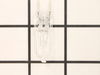
Both Nite lights burned out, again.
So simple, unscrew the hatch underneath the microwave oven, pull out old bulbs, and insert new.
Parts Used:
-
Karen from Berea, OH
-
Difficulty Level:Really Easy
-
Total Repair Time:Less than 15 mins
-
Tools:Screw drivers
Was this instruction helpful to you?
Thank you for voting!
Surface lights burned out
Opened the cover. Removed burned out bulbs. Ordered replacements which arrived fairly quickly. Forgot to turn off power to unit (didn't matter in the end!). Using the bubble wrap the new bulbs came in, I inserted the bulbs one by one into their respective sockets. Not really tricky but the surface light is in the back of the microwave so I had to lean over the stove to get all the way back. Once in the bulbs worked fine. Closed the cover. All back to normal.
Parts Used:
-
Robert from Las Cruces, NM
-
Difficulty Level:Really Easy
-
Total Repair Time:Less than 15 mins
-
Tools:Screw drivers
Was this instruction helpful to you?
Thank you for voting!
light bulbs burned out
Used screwdriver, removed cover, took out old bulbs and replaced with new ones. Couldn't get any easier.
Parts Used:
-
Kim from Poway, CA
-
Difficulty Level:Really Easy
-
Total Repair Time:Less than 15 mins
-
Tools:Screw drivers
Was this instruction helpful to you?
Thank you for voting!
Powered Off completely
After reading reviews that there was no power what so ever and a fuse replacement will solve the problem, I tried it. Replacing the fuse is very easy (and I am not handy at all). All you have to do is remove the microwave cover from the top by removing two screws, slide the cover to the left and pulling the cover off. Then remove the grill in front of you, by removing one or two screws. The fuse is in front of you, use pliers and be firm but gentle. Replacing the fuse is easy but it did not solve my problem.
Parts Used:

-
Mohammad from Piscataway, NJ
-
Difficulty Level:Easy
-
Total Repair Time:Less than 15 mins
-
Tools:Screw drivers
Was this instruction helpful to you?
Thank you for voting!
bulb replacement
-
andrew from malta, NY
-
Difficulty Level:Really Easy
-
Total Repair Time:Less than 15 mins
-
Tools:Screw drivers
Was this instruction helpful to you?
Thank you for voting!
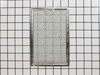
Our Microwave was missing the grease filters
-
Douglas from Chelsea, AL
-
Difficulty Level:Really Easy
-
Total Repair Time:Less than 15 mins
Was this instruction helpful to you?
Thank you for voting!
All power to the microwave went out.
PartSelect had helpful repair instructions on-line which made the repair easier and faster. Unfortunately, there were other problems with the oven that immediately blew the new fuse I had just installed. It was then determined that additional repair would most likely cost almost as much as a new microwave.
Parts Used:
-
Michael from East China Township, MI
-
Difficulty Level:Easy
-
Total Repair Time:Less than 15 mins
-
Tools:Screw drivers
Was this instruction helpful to you?
Thank you for voting!
both lights burned out, used for 8 years or more
My daughter hand installed bulbs without a problem, took a minute and used a phillips to reinstall the cover. I shopped on-line because I wasted two hours between Lowe's and Home Depot trying to get the right bulb. I did think your postage was crazy high, otherwise glad to get the right bulbs to solve the problem.
Parts Used:
-
diana from lincoln, CA
-
Difficulty Level:Really Easy
-
Total Repair Time:Less than 15 mins
-
Tools:Screw drivers
Was this instruction helpful to you?
Thank you for voting!
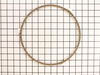
We had no ring so the turning plate tipped
I lifted out the glass plate, put the ring down, and put the glass plate on top of it. Voila!
Parts Used:
-
Sian from Harrisonburg, VA
-
Difficulty Level:Really Easy
-
Total Repair Time:Less than 15 mins
Was this instruction helpful to you?
Thank you for voting!
Interior lightbulb needed to be replaced
I could not for the life of me figure out how to get into the light housing so I could replace the bulb, nor did I have any idea which bulb to buy. The manual for this model descibes how to replace the underside lighting but they seem to have left out instructions about the interior. I watched the short "how-to" video on this site, bought the bulb that was described and replaced the bulb in five minutes without any issues.
Parts Used:
-
Jean from Princeton, NJ
-
Difficulty Level:Really Easy
-
Total Repair Time:Less than 15 mins
-
Tools:Screw drivers
Was this instruction helpful to you?
Thank you for voting!
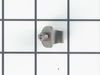
Rack holder had broken off
Ordered part and looked at the install video and with in 2 minutes the new one was installed
Parts Used:
-
Bradley V from Plainfield, IN
-
Difficulty Level:Really Easy
-
Total Repair Time:Less than 15 mins
-
Tools:Pliers
Was this instruction helpful to you?
Thank you for voting!
Light Bilbao burned out
Simple repair..took off covering with screwdriver removed the halogen bulb and replaced with the one I ordererd..wish all repairs went so well..
Parts Used:
-
Stephen from Kennett Square, PA
-
Difficulty Level:Really Easy
-
Total Repair Time:Less than 15 mins
-
Tools:Screw drivers
Was this instruction helpful to you?
Thank you for voting!
The glass microwave turntable for the microwave was dropped and it brokd.
Opened the box, put the glass turntable on the center fitted over the three little bumps.
Parts Used:

-
Lois from Sarasota, FL
-
Difficulty Level:Really Easy
-
Total Repair Time:Less than 15 mins
Was this instruction helpful to you?
Thank you for voting!
Light on hood of microwave burned out.
Removed tiny screw from under the microwave that held the lid shut where the light was located. Took out old bulb and replaced with new one. Very easy!!!!
Parts Used:
-
Shirley from Collins, MS
-
Difficulty Level:Easy
-
Total Repair Time:Less than 15 mins
-
Tools:Screw drivers
Was this instruction helpful to you?
Thank you for voting!
circuit shortage shows, i thing it because i heat on the counter too long cause the thermotart not fumctional.
-
Rong from Portland, OR
-
Difficulty Level:Really Easy
-
Total Repair Time:Less than 15 mins
Was this instruction helpful to you?
Thank you for voting!