















4K5SSOB0 KitchenAid Mixer - Instructions
Keep searches simple. Use keywords, e.g. "leaking", "pump", "broken" or "fit".
Pinion gear failed, broken tooth mixer stalled and mixers wouldn't turn.
Went to partselect, found model number, printed blow-up of mixer. Figured out disassenbly procedure. Drove out main pin removing mixer head from stand. Save pin. Drove out pin in mixer main shaft which allowed planetary head to be removed. Save pin.
Removed stainless steel bezel to expose screws for removal of bottom half of mixer body. Removed screws and carefully separated mixer halves using two screwdrivers as prybars. Care must be exercised to prevent chipping of paint on body.
Separated body. cleaned grease from gears to find actual problem. Removed broken geartooth and grease near broken part to make sure no small broken chips remained. Removed pinion shaft assembly, drove pin from gear releasing broken pinion/shaft. Save pin/
Cleaned grease from pinion shaft assembly using mineral spirits and a small brush to reveal how part could be disassembled. Ordered part immediately on-line. Part arrived 1 business day after it was ordered.
Reversed process for replacing pinion shaft. Applied fresh grease obtained from excess already in mixer, spun pinion shaft to make sure grease was properly distributed. Reinstalled pinion shaft assembly. CAREFULLY plugged in mixer and jogged motor to make sure all was free and that mixer worked. If you can repair this mixer, you should have enough sense to do this diagonistic. Keep fingers away from all moving parts, don't touch expposed electric wires. Plug in only after making sure switch is in off position. Jog using mixer switch. Make sure mechanism is free.
Complete re-assembly by following blow-up and reversing disassembly steps. It may be good to write down you disassemblly procedure if it is possible that you won't be reassembling within a day or two.
Removed stainless steel bezel to expose screws for removal of bottom half of mixer body. Removed screws and carefully separated mixer halves using two screwdrivers as prybars. Care must be exercised to prevent chipping of paint on body.
Separated body. cleaned grease from gears to find actual problem. Removed broken geartooth and grease near broken part to make sure no small broken chips remained. Removed pinion shaft assembly, drove pin from gear releasing broken pinion/shaft. Save pin/
Cleaned grease from pinion shaft assembly using mineral spirits and a small brush to reveal how part could be disassembled. Ordered part immediately on-line. Part arrived 1 business day after it was ordered.
Reversed process for replacing pinion shaft. Applied fresh grease obtained from excess already in mixer, spun pinion shaft to make sure grease was properly distributed. Reinstalled pinion shaft assembly. CAREFULLY plugged in mixer and jogged motor to make sure all was free and that mixer worked. If you can repair this mixer, you should have enough sense to do this diagonistic. Keep fingers away from all moving parts, don't touch expposed electric wires. Plug in only after making sure switch is in off position. Jog using mixer switch. Make sure mechanism is free.
Complete re-assembly by following blow-up and reversing disassembly steps. It may be good to write down you disassemblly procedure if it is possible that you won't be reassembling within a day or two.
Parts Used:

-
Michael from Palos Park, IL
-
Difficulty Level:Easy
-
Total Repair Time:30 - 60 mins
-
Tools:Screw drivers
1 person
found this instruction helpful.
Was this instruction helpful to you?
Thank you for voting!
KitchenAid Mixer was leaking oil/grease
Replaced gasket and O-ring. Problem solved. POC (Piece of Cake).
Parts Used:


-
Russ from Lawrenceville, GA
-
Difficulty Level:Easy
-
Total Repair Time:30 - 60 mins
-
Tools:Screw drivers
1 person
found this instruction helpful.
Was this instruction helpful to you?
Thank you for voting!
Worn Worm gear. Mixer made a clunking noise and wouldn't turn.
Followed your instructions from the internet and it was a simple fix. Mixer works great again. Thank You ..you made it easy!
Parts Used:

-
Deborah from HUNTINGTON, IN
-
Difficulty Level:Really Easy
-
Total Repair Time:15 - 30 mins
-
Tools:Screw drivers
1 person
found this instruction helpful.
Was this instruction helpful to you?
Thank you for voting!
Damaged gears in both machines. Been setting around for a few years broken. Gears broke way too soon.
Simply removed damaged gears. Very simple to do. Ordered gears. Replaced gears. Both working well ( so far. ) Machines are easy to dismantle. Just be sure to put the screws back in the holes you took them out of when dismantling...no lost screws. On the smaller model, took pictures of the wire positions to be sure they were replaced in the proper order. Larger model had no wires to remove.
Parts Used:
-
Ethan from MEADVILLE, PA
-
Difficulty Level:Very Easy
-
Total Repair Time:15 - 30 mins
-
Tools:Screw drivers
1 person
found this instruction helpful.
Was this instruction helpful to you?
Thank you for voting!
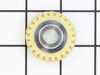
The mixer broke the worm gear(the only plastic gear inside the mixer) and needed replaced.
I took apart the mixer housing and removed all the screws. The most difficult part was the two pins that needed to be removed with a metal punch. They were in fairly tight. The mixer came apart pretty easily and it was obvious which part needed to be replaced as it was broken and missing teeth. After replacing the gear and applying new grease for smooth operation, I simply put it back together and it has worked like new ever since.
Parts Used:
-
Dustin from JACKSONVILLE, NC
-
Difficulty Level:Easy
-
Total Repair Time:15 - 30 mins
-
Tools:Screw drivers
1 person
found this instruction helpful.
Was this instruction helpful to you?
Thank you for voting!
Damaged insulation on the cord
Removed back cover, disconnected the 2 push-on connectors, removed ground wire screw. Reversed the process to install new cord.
Parts Used:

-
Dennis from WESTERVILLE, OH
-
Difficulty Level:Really Easy
-
Total Repair Time:15 - 30 mins
-
Tools:Screw drivers
1 person
found this instruction helpful.
Was this instruction helpful to you?
Thank you for voting!
worm gear worn out
I watched a short video on replacing the worm gear, although I did not know what the problem was until I watched the video. after the video ended I took the mixer apart and found the problem located a parts number an placed my order. got the part in one week put in the new part in about 20 minutes and it work like new. and the price was very reasonable
Parts Used:
-
michael from CISCO, GA
-
Difficulty Level:Very Easy
-
Total Repair Time:15 - 30 mins
-
Tools:Screw drivers
2 of 4 people
found this instruction helpful.
Was this instruction helpful to you?
Thank you for voting!
short in the wiring had blown the ground plug out,,,contact with a mounting screw head
had to replace the outlet strip and relocate the mounting screw,,,,wiring cord to the mixer was super correct and had to simply follow basic wiring (black to black,,,silver to silver,,,green to ground) ,,, the cord came with the correct mounting bushing already on the cord. Thx a bunch!
Parts Used:
-
dan from ELIZABETH, WV
-
Difficulty Level:Really Easy
-
Total Repair Time:15 - 30 mins
-
Tools:Screw drivers
1 person
found this instruction helpful.
Was this instruction helpful to you?
Thank you for voting!
Beater replacement
-
William from SPARTANBURG, SC
-
Difficulty Level:Very Easy
-
Total Repair Time:Less than 15 mins
2 of 4 people
found this instruction helpful.
Was this instruction helpful to you?
Thank you for voting!
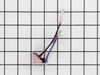
Mixer went to high speed immediately on starting
Simple fix actually. UNPLUG mixer and remove the one screw on top that holds on the back. The Phase control board sits under and behind the paper insulator and "switch" assy. Remove the 4 wires with a pair of needle nose pliers, the one screw holding it to the back of the mixer and install the new one in reverse order.
Parts Used:
-
Michael from JACKSONVILLE, FL
-
Difficulty Level:Really Easy
-
Total Repair Time:Less than 15 mins
-
Tools:Pliers, Screw drivers
1 person
found this instruction helpful.
Was this instruction helpful to you?
Thank you for voting!
Mixer operarates at high speed only.
-
GALO from DECATUR, GA
-
Difficulty Level:Really Easy
-
Total Repair Time:Less than 15 mins
-
Tools:Screw drivers
1 person
found this instruction helpful.
Was this instruction helpful to you?
Thank you for voting!
spring latch was broken

-
Jack from GLEN ALLEN, VA
-
Difficulty Level:Very Easy
-
Total Repair Time:Less than 15 mins
-
Tools:Screw drivers
1 person
found this instruction helpful.
Was this instruction helpful to you?
Thank you for voting!
Splash from K45 KitchenAid Mixer Bowl
The shield works sufficiently. Note that the shield is not a continuous circle as shown in the picture. This actually can be an asset because it can be installed or disassembled without stopping the mixer of having to lift the head while running.
Parts Used:

-
Mark from LEXINGTON, SC
-
Difficulty Level:Very Easy
-
Total Repair Time:Less than 15 mins
1 person
found this instruction helpful.
Was this instruction helpful to you?
Thank you for voting!
Spring latch snapped off making bowl unstable and unless hand stabilized wobbled too much to use.
SO SIMPLE!!!!! Using a regular screwdriver, remove the remains of the Spring Latch. Place new one over holes and screw new one in place using the currently used screws. May wash off screws first if caked with gunk. OMG!!! TOOOO easy and saved me from throwing out a very terrific 40 year old PRO LINE KITCHEN AID MIXER!! To replace it would have been hundreds of dollars.
Parts Used:
-
Marcia from NEW YORK, NY
-
Difficulty Level:Very Easy
-
Total Repair Time:Less than 15 mins
-
Tools:Screw drivers
1 person
found this instruction helpful.
Was this instruction helpful to you?
Thank you for voting!
Burnt brushes
The brushes are located on each side of the tilt head of the mixer. I used a screwdriver to remove the screws, removed the brushes & replaced with the new ones. Runs great again!!
Parts Used:

-
Sabrina from BUNKIE, LA
-
Difficulty Level:Very Easy
-
Total Repair Time:Less than 15 mins
-
Tools:Screw drivers
1 person
found this instruction helpful.
Was this instruction helpful to you?
Thank you for voting!