Your coupon for will be reflected when you check out!
✖
Your coupon for
✖
Hello!
You're visiting the PartSelect site in U.S.
Would you like to shop on the Canadian site?
Stay on this site
Go to Canadian site
✖
Model Number Locations
1Select Category Type
Select Category Type
2Select Product Type
Select Product Type
3Select {MODEL} Type
Select {MODEL} Type
Sample Model Number Tags
Model numbers can be made up of numbers (1005400, for example) or a combination of letters and numbers (LAT1000AAE). The model number will most likely appear on either a paper sticker or a metal plate. Your appliance's model number tag may look similar to the sample model number tags shown here (model number highlighted in yellow):
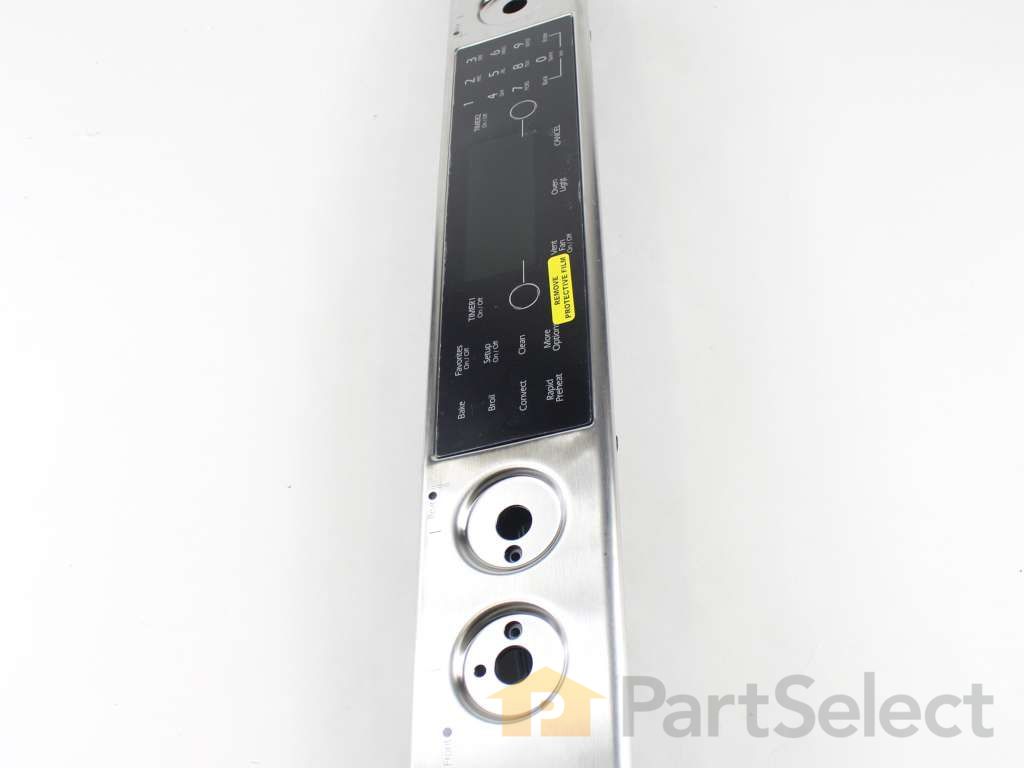
This genuine OEM range control panel assembly houses the user interface, including buttons and a display, for managing settings such as temperature, timers, and cooking modes. Designed for durability and precision, it restores functionality when the original panel fails due to unresponsive buttons, a blank display, or intermittent control issues. Featuring a sleek black and silver finish, this replacement part ensures reliable user input and clear visual feedback. Professional installation is recommended for proper alignment and secure fit.
How Buying OEM Parts Can Save You Time and Money
Why buy the real thing?
OEM stands for Original Equipment Manufacturer. Simply put, this means that the company who made your appliance is also supplying the replacement part for it.
We're sorry, but our Q&A experts are temporarily unavailable.
Please check back later if you still haven't found the answer you need.
5 questions answered by our experts.
Sort by:
< Prev
1
Next >
Search filter:
Clear Filter
Your search term must have 3 or more characters.
Keep searches simple. Use keywords, e.g. "leaking", "pump", "broken" or "fit".
Sorry, we couldn't find any existing answers that matched.Try using some different or simpler keywords, or submit your new question by using the "Ask a Question" button above!
Richard
November 5, 2018
The touch numbers 7, 8 and 9 no longer work but everything else does. Is there a module behind there that is replaceable?
For model number JGS9900BDS
Hello Richard, Thank you for the question. If some of the buttons work and others do not, it is most likely an issue with the touch pad on the control panel, PartSelect Number PS11750327. Hope this helps, good luck with this repair!
1 person found this helpful.
Did this question help you?
Thank you for voting!
Pat
November 17, 2019
Clarification of previous question based on updated info.Keypad numbers 7,8,9,and 0 quit working several years ago. recently, remaining panel buttons suddenly quit workin, with an exception. keypad numbers 1to 6 will beep when pressed, although nothing shows up. no sound or indication from any other buttons.
the clock continues to indicate and update.
cycling power results in display of 2 fault codes ee214 and m214 which flash alternately with “power loss”. they will not clear with any of the ‘dead’ buttons, but clear by depressing numbers 1-6 on keypad.
is this a control panel or control board issue? if could be either, any troubleshooting to isolate?
thanks
For model number Jgs9900bds
Hello Pat and thanks for writing.
It sounds like you in need of the control panel for your unit. Yes. Part Number: PS11745986 is in the list of compatible items for your model. We hope this helps. Please contact us anytime.
My JGS9900BDS oven control panel is partially working. For example, the Bake and other buttons do not activate oven, broiler, etc. I can set timer. I cannot increase or decrease temperature. The last thing I did prior to this happening was to run the self-cleaning mode. Prior to, the oven has operated like a champ!
For model number JGS9900BDS
Hello Max, Thank you for contacting us. We have researched the model you have provided and have found the part you are looking for is PartSelect Number PS11745986. If you need help placing an order, customer service is open 7 days a week. Please feel free to give us a call. We look forward to hearing from you!
About a year ago several buttons on the control panel stopped working. Examples would be that i was no longer able to set the time or turn on the vent. When i would push those buttons, nothing would happen. Recently the oven stopped working as well. It can't seem to get above 120 degrees no matter what temp i set it for. I would love your thoughts on how to fix it or if i should just give up on this thing and get a new range.
For model number JGS9900BDS16
Hello Nate, Thank you for the question. Normally if some buttons work and others do not, the touch pad and control board Part Number: PS11745986 will need to be replaced. You should also test the Sensor Probe. PartSelect Number: PS2003225. Testing the temperature sensor probe on your oven is easy. With the sensor at room temperature, measure the resistance between the two prongs at the end of the sensor connector. The resistance of the sensor should read approximately 1080 – 1090 ohms at room temperature. Thank you for your inquiry, good luck with this repair!