















ZSC2001CSS General Electric Microwave - Instructions
Keep searches simple. Use keywords, e.g. "leaking", "pump", "broken" or "fit".
Microwave dead--no LEDs lit on front panel
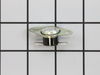
Removed microwave from enclosure and removed cover, hoping it was as simple as a blown fuse. Found extremely helpful diagnostic sheet thoughtfully provided by manufacturer in an envelope affixed to top of cavity. Fuse was fine, but tracing the power feed into the machine revealed that the oven cavity thermostat was open--no continuity across it, and the diagnostic sheet indicated that it was non-resettable. Verified the issue by temporarily by-passing the blown thermostat to ascertain that the front panel display got power. It took longer to get the screws for the cover and enclosure back on than it did to replace the thermostat, once I received the replacement part. Microwave works just fine now, thanks!
Parts Used:
-
Steve from Redmond, WA
-
Difficulty Level:Easy
-
Total Repair Time:15 - 30 mins
-
Tools:Screw drivers
37 of 45 people
found this instruction helpful.
Was this instruction helpful to you?
Thank you for voting!
Noise and no Heat on Microwave oven.
First, I waste $65 by calling some "REPAIR" service. They showed at home and charge me that just to tell me
Second, I researched on the web and ordered a part, which was not the issue. I waste abnother $72
Third, I found Part-Select and got the right answer: the Diode was the problem. Ordered the part form Part-Select and it FIxed it !!!
Note: I did not buy a new microwave because this one is mounted on the wall and it will cost me +$800 just the lowest price.
Second, I researched on the web and ordered a part, which was not the issue. I waste abnother $72
Third, I found Part-Select and got the right answer: the Diode was the problem. Ordered the part form Part-Select and it FIxed it !!!
Note: I did not buy a new microwave because this one is mounted on the wall and it will cost me +$800 just the lowest price.
Parts Used:
-
Luis from Plano, TX
-
Difficulty Level:Easy
-
Total Repair Time:Less than 15 mins
-
Tools:Screw drivers, Wrench set
33 of 49 people
found this instruction helpful.
Was this instruction helpful to you?
Thank you for voting!
while cooking a big dish of food, the microwave just stopped and went black
Fortunately, my brother-in-law suggested it might be the "cut out" switch. After unplugging the microwave, I opened it up and identified one of two cut outs and removed the wires from each side of the cut out. To test if that was the problem, I connected the two wires together, bypassing the cut out. When I plugged the unit back into the wall socket, the lights came back on, and i ran the microwave for a few seconds. It verified that this was the problem. I ordered the part and when it arrived, I removed it with a philips screw driver and replaced it with the new one. I replaced the screw, buttoned the unit back up, plugged it in, and saved a few hundred bucks on a replacement microwave, and as important, saved our landfills and planet a tiny but.
Parts Used:
-
Mark from South Jordan, UT
-
Difficulty Level:Really Easy
-
Total Repair Time:Less than 15 mins
-
Tools:Screw drivers
19 of 21 people
found this instruction helpful.
Was this instruction helpful to you?
Thank you for voting!
Microwave went dead/no display
Took the cabinet off the microwave and checked for a fuse. Found that it was good, then checked for the voltage path to the controls and found the cavity thermal cut out was not conducting. Using a voltage meter to check things. Unplug the microwave for several of the tests. You must know how to work with electricity to do this. Installed the new part and the microwave now works. As a hint to what had happened my wife had heated a large casserole then right after that went to heat a smaller dish. At that time the microwave was hot and did not restart.
Parts Used:
-
Glenn from Sparta, WI
-
Difficulty Level:Really Easy
-
Total Repair Time:15 - 30 mins
-
Tools:Screw drivers
13 of 14 people
found this instruction helpful.
Was this instruction helpful to you?
Thank you for voting!
Microwave display showed nothing, no power.
Per the troubleshooting diagram inside the microwave oven, I discovered the one of the TCO was open (using Ohmmeter). Found my microwave oven model on PartSelect and used the diagram to select the TCO needed and placed order. Part came in three days, installed new TCO, reconnected wires and the microwave oven was back working in 10 minutes.
Parts Used:
-
Bruce from Sammamish, WA
-
Difficulty Level:Really Easy
-
Total Repair Time:15 - 30 mins
-
Tools:Screw drivers
11 of 13 people
found this instruction helpful.
Was this instruction helpful to you?
Thank you for voting!
ove black out
must of had loose connection from wire terminal
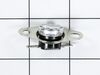
to thermostat from factory. thermostat and wires
were melted. removed thermostat. and cut burnt
wires back. replaced thermostat and terminals.
used better quality terminals than factory.
also checked and tightened other loose connections. there was enough wire left after cut back to just put on new terminals.
to thermostat from factory. thermostat and wires
were melted. removed thermostat. and cut burnt
wires back. replaced thermostat and terminals.
used better quality terminals than factory.
also checked and tightened other loose connections. there was enough wire left after cut back to just put on new terminals.
Parts Used:
-
Glen from Highland, IL
-
Difficulty Level:Easy
-
Total Repair Time:15 - 30 mins
-
Tools:Screw drivers
10 of 13 people
found this instruction helpful.
Was this instruction helpful to you?
Thank you for voting!
When running a burning plastic smell coming from the venting air.
Took the cover off (removed the five screws, two of which were security screws off the back) and found one connector on the thermal cut out with its shielding melted. Very easy swap out of the new cut out and we were up and running as if new.
Parts Used:
-
Paul from Modesto, CA
-
Difficulty Level:Really Easy
-
Total Repair Time:Less than 15 mins
-
Tools:Screw drivers
10 of 14 people
found this instruction helpful.
Was this instruction helpful to you?
Thank you for voting!
microwave did not operate
this is not fair to the do it yourself person because I have been an electrican for forty one years I removed the cover spotted the burnt limit switch ordered the part replaced the part and checked operation of the microwave thanks for the painless task of locating and ordering of needed part
Parts Used:
-
Kenneth from Giddings, TX
-
Difficulty Level:Really Easy
-
Total Repair Time:Less than 15 mins
-
Tools:Screw drivers
9 of 14 people
found this instruction helpful.
Was this instruction helpful to you?
Thank you for voting!
Microwave Oven overheated
I thought I was setting the timer only on the microwave and accidently cooked an empty oven for 10 minutes. It was dead and I used the schematic and figured out the problem. Got the part and installed in 10 or less minutes. Oven is back in action.
Parts Used:
-
David from Collegeville, PA
-
Difficulty Level:Really Easy
-
Total Repair Time:Less than 15 mins
-
Tools:Screw drivers
9 of 16 people
found this instruction helpful.
Was this instruction helpful to you?
Thank you for voting!
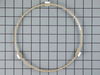
broken little wheel
-
KAREN from GATES MILLS, OH
-
Difficulty Level:Really Easy
-
Total Repair Time:Less than 15 mins
7 of 10 people
found this instruction helpful.
Was this instruction helpful to you?
Thank you for voting!
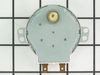
Turntable drive moter making ratcheting sound
Removed power from unit. Removed 7 screws from cover on bottom of microwave. Unplugged the power connector from the installed motor. Removed 2 screws holding motor. Positioned new motor using small nibs used for purpose of proper positioning. Used mounting screws removed from old motor to firmly fix new motor in place. Installed original mounting screws holding bottom cover in place. Connected power and tested operation.
Parts Used:
-
Stan from LOS ALAMOS, NM
-
Difficulty Level:Really Easy
-
Total Repair Time:15 - 30 mins
4 of 4 people
found this instruction helpful.
Was this instruction helpful to you?
Thank you for voting!
Microwave missing a roller guide
When we bought our house, the microwave was missing a 'roller guide'. I didn't know that part even had a name, but your website made it easy for me to figure out. When it arrived, like the next day - I just unpacked it and placed it inside the microwave. Done! Thanks for the help!
Parts Used:
-
LAURA from GALVESTON, TX
-
Difficulty Level:Really Easy
-
Total Repair Time:Less than 15 mins
5 of 10 people
found this instruction helpful.
Was this instruction helpful to you?
Thank you for voting!
Roller stems wore out; rollers fell off
Open door. Remove tray. Remove old roller assembly. Insert new roller assembly. Replace tray. Close door. It took more time and effort to unpack it than it did to replace it.
Parts Used:
-
Jim from E PATCHOGUE, NY
-
Difficulty Level:Very Easy
-
Total Repair Time:Less than 15 mins
2 of 2 people
found this instruction helpful.
Was this instruction helpful to you?
Thank you for voting!
Bad thermostat
Removed outer case, checked fuse first, it was good so went to thermostat. No continuity reading. Unhooked thermostat, used jumper wires to by-pass break—briefly plugged the unit in. It came on so I knew the issue was definitely the thermostat.
Parts Used:
-
John from COVINGTON, GA
-
Difficulty Level:Really Easy
-
Total Repair Time:Less than 15 mins
-
Tools:Screw drivers
2 of 2 people
found this instruction helpful.
Was this instruction helpful to you?
Thank you for voting!
No power, no lights, did not work
-
Igor from Delray Beach, FL
-
Difficulty Level:Really Easy
-
Total Repair Time:30 - 60 mins
-
Tools:Pliers, Screw drivers, Socket set
1 person
found this instruction helpful.
Was this instruction helpful to you?
Thank you for voting!