















YKMMS130RPS00 KitchenAid Microwave - Overview
Sections of the YKMMS130RPS00
[Viewing 6 of 6]


Keep searches simple, eg. "belt" or "pump".

Microwave Turn Ring
PartSelect #: PS12584163
Manufacturer #: W11252182
This turntable ring in your microwave makes sure that your glass tray rotates smoothly. Located just above the internal floor, it supports the tray so that your food cooks evenly. A broken turntable r...
$38.06
In Stock
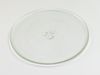
Cook Tray
PartSelect #: PS12728436
Manufacturer #: W11367904
The glass turntable tray rotates food in the microwave to ensure even heating. Designed for compatibility with specific models, it provides a stable surface for cookware. Check fitment before ordering...
$59.11
In Stock
Mounting Plate
PartSelect #: PS12074431
Manufacturer #: W11025649
This mounting plate is sourced directly from the original manufacturer for use with microwaves. It is a metal plate designed to support a microwave by attaching the microwave to the wall studs. If the...
$23.05
In Stock
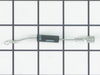
DIODE
PartSelect #: PS12584264
Manufacturer #: W11256462
This diode, or high voltage diode, is used in microwaves. It is an electrical current control device that ensures power flows in one direction and not the other way. If your microwave produces no heat...
$26.20
In Stock

R Ceramic Fuse 20 A
PartSelect #: PS17629444
Manufacturer #: W11707984
If your microwave is not turning on it could be due to your fuse needing to be replaced. This part protects the microwave by shutting it off if there is an electrical surge. This fuse is just over an ...
$36.00
In Stock

Microwave Damper
PartSelect #: PS11728088
Manufacturer #: W10843943
This damper is an authentic OEM replacement assembly used in microwave/range hood combos. It includes the damper door and frame. It is designed to direct the flow of air through the vent duct, and the...
$59.11
In Stock
Charcoal Filter
PartSelect #: PS11769323
Manufacturer #: W10892387
Don't you just wish your Whirlpool appliance could work as smoothly as it used to? If so, it?s time to meet the Whirlpool Agitator Cam Bearing. This genuine, original manufacturer (OEM) part is specif...
$18.85
In Stock
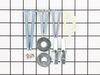
Hardware Kit
PartSelect #: PS11730898
Manufacturer #: W10821385
This is a manufacturer-approved mounting kit for your microwave. This kit is crucial for keeping your microwave securely wall-mounted. This kit does not include the mounting plate itself. This kit com...
$74.41
In Stock
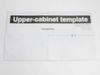
TEMPLATE
PartSelect #: PS2362798
Manufacturer #: W10190018
Discover the power of a premium-quality appliance part brought to you by Whirlpool. This original upper template is designed for meticulous precision in your microwave installation process. Produced b...
$8.35
In Stock

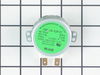
MOTOR-TURN
PartSelect #: PS11729872
Manufacturer #: W10642989
This motor is used to rotate the cooking tray.
$85.29
In Stock
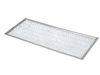
FILTER
PartSelect #: PS12745226
Manufacturer #: W11391715
This quality Whirlpool Microwave Grease Filter offers easy maintenance and optimal functionality. Designed with precision, it is compatible with select Whirlpool, KitchenAid, Maytag, Jenn-Air, Amana, ...
$16.75
In Stock
Questions And Answers for YKMMS130RPS00
We're sorry, but our Q&A experts are temporarily unavailable.
Please check back later if you still haven't found the answer you need.
Common Symptoms of the YKMMS130RPS00
[Viewing 5 of 5]No heat
Fixed by
these parts
these parts

Show All
Won’t turn on
Fixed by
these parts
these parts
Show All
Tray won’t turn
Fixed by
these parts
these parts

Show All
Noisy
Fixed by
these parts
these parts
Show All
Exhaust fan not working
Fixed by
these parts
these parts
Show All
Keep searches simple. Use keywords, e.g. "leaking", "pump", "broken" or "fit".
Microwave not heating, working otherwise
This was an over-the-range microwave/hood, so the replacement parts were significantly cheaper than buying a new unit.
Take microwave down (really a two-person job). Remove microwave cover (about 20 philips screws), discharge HV capacitor by shorting terminals to microwave case. Take photos before pulling anything apart. R ... Read more emove plastic ducting covering part of the magnetron (3 philips screws). Remove old magnetron (4 Torx screws), need to disconnect small thermostat on side (2 philips screws) and replace with new magnetron. Replace HV diode (screw on one end, other end simply plugged into capacitor terminal). Put everything back together and it works fine.
Take microwave down (really a two-person job). Remove microwave cover (about 20 philips screws), discharge HV capacitor by shorting terminals to microwave case. Take photos before pulling anything apart. R ... Read more emove plastic ducting covering part of the magnetron (3 philips screws). Remove old magnetron (4 Torx screws), need to disconnect small thermostat on side (2 philips screws) and replace with new magnetron. Replace HV diode (screw on one end, other end simply plugged into capacitor terminal). Put everything back together and it works fine.
Read less
Parts Used:
-
Keith from Chandler, AZ
-
Difficulty Level:Easy
-
Total Repair Time:30 - 60 mins
-
Tools:Screw drivers
52 of 61 people
found this instruction helpful.
Was this instruction helpful to you?
Thank you for voting!
Microwave made very loud noise while on. No heat.
Unless you have a very comfortable background with electronics and electricity, I don't necessarily recommend taking apart a microwave. If you are very handy and are going to be VERY cautious to follow the rules of discharging caps and testing voltages before moving forward, then go for it. That said, I took the microwave off and apart.
... Read more
Not knowing where to find the parts, I was fortunate that the installer put the instruction book for the microwave inside the front vent slot above the touchpad for reference. it details the location of every part and it tells you very clearly what each part you test should show specific to this microwave on your multimeter. Find this guide online if you don't have it. Turn on the microwave for 20 seconds with a glass of water to make sure it's not heating - that with the noise means it's eeither the magnetron, cap, or diode. Read the notes on this site for all of the basic things to look for with the magnetron, diode, and capacitor. Once comfortable with the guide, locations of those devices, and how to test, then take it down and apart. Unfortunately, I didn't do all those things in that order, and it only wasted a lot of time trying to find the parts. Once I found the parts and put all the screws and covers back for all the areas that didn't need to be accessed for the repair, testing went quickly. The diode was bad. Ordered a new one and had it in 3 days or so. That means your microwave will be apart and sitting somewhere for a little while until you get the part and have time to repair it. Putting the diode back isn't too bad. Reassemble the microwave and put it back up again. If i had to do it again, it would take me 20 to 30 minutes once the microwave was down and on a table. Also, I used some bricks with towels over them or you could use some sawhorses to keep the microwave elevated so you can plug it in and run it after installing the new component. Again, make sure you discharge the cap before touching anything again even if you didn't run it, but just plugged it in.
Read less
Parts Used:
-
Sleiman from Miami, FL
-
Difficulty Level:Easy
-
Total Repair Time:More than 2 hours
-
Tools:Pliers, Screw drivers
51 of 83 people
found this instruction helpful.
Was this instruction helpful to you?
Thank you for voting!
Humming sound, not heating.
I turn off the income electricity by shutting down the corresponding circuit breaker. Then, I removed the control panel from the microwave which gave me access to the capacitor and adjacent diode. After that i unscrewed the defective diode and replaced it with the new one and BINGO!
Parts Used:
-
Fausto from Miramar, FL
-
Difficulty Level:Easy
-
Total Repair Time:15 - 30 mins
-
Tools:Nutdriver, Pliers, Screw drivers
43 of 61 people
found this instruction helpful.
Was this instruction helpful to you?
Thank you for voting!