















XBS360DM4WW General Electric Range - Instructions
Keep searches simple. Use keywords, e.g. "leaking", "pump", "broken" or "fit".
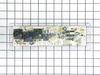
Blown Oven Control Board
After removing the back of the range the oven control board was visible and accessible by removing four nuts. There was some resistance removing the leads from the oven coils and light-bulb mechanisms but with some leverage and pliers they came loose. The only challenge was the face plate of the unit is attached using adhesive and needed to be carefully peeled off and added to the new oven control board. Getting this right was just a matter of taking time and lining up the components correctly. After applying the face, the new control board went right in. I reattached the back, plugged the unit back in, and the over has worked great for the past week. Part select being able to identify the part numbers listed from the component likely saved me at least $100 of having a GE certified repair technician come in.
Parts Used:
-
Julien from Barnhart, MO
-
Difficulty Level:A Bit Difficult
-
Total Repair Time:15 - 30 mins
-
Tools:Nutdriver, Screw drivers
56 of 63 people
found this instruction helpful.
Was this instruction helpful to you?
Thank you for voting!
after lightning cooktop worked oven did not
called service co. and described problem while i was looking at parts diagram and he agreed with my feeling what part got fried. he told me the part would be 183.00 plus labor and drive time. when i told him i was looking at the part on line for 65 dollars he hung up on me. i recieved the part and was slightly dissapointed to know there was a sepperate adhesive overlay. i saw that it was a sepperate part but if i knew it was adhesive i would have spent the extra 20 dollars for a new one. but, to my surprise the old one peeled off easily and gently re-apllied it to the new conrol board alighning it well seemed to be the trickiest part of the job. took the five wires with connectors out of the old one and inserted them into the same place on the new one. removed the old one from the frame (4 pan phillp sheet metal screws) and then screwed the new wired control board in. plugged in the unit and pressed the bake button and then mixed the brownie batter. replaced the back panel cover. 65 dollars and 15 minutes.
thanks
bob
thanks
bob
Parts Used:
-
robert from OXFORD, CT
-
Difficulty Level:Really Easy
-
Total Repair Time:15 - 30 mins
-
Tools:Screw drivers
47 of 57 people
found this instruction helpful.
Was this instruction helpful to you?
Thank you for voting!
Yje electronic control panel was shorted out. I orderd a new one and in a timely mannor your service delivered the part via Fed Ex.
The repair was simple. All wires were color coded and the new part had the same color codes marked. Simply unplugged the wires from the bad part and plugged them into the new part a reinstalled the part to the back panel of the range.
Parts Used:
-
Gary from Wichita, KS
-
Difficulty Level:Really Easy
-
Total Repair Time:15 - 30 mins
-
Tools:Nutdriver
28 of 36 people
found this instruction helpful.
Was this instruction helpful to you?
Thank you for voting!
Oven wouldn't heat
Remove upper rear cover (4 hex screws), then I removed the 4 phillips screws that mount the control panel, I memorized the wire positions (easy since they are color coded) unplug the wires and remove the old control panel. The face plate of the control panel did not come off easily and the adhesive pulled off some of the white paint, leaving an unsightly clear edge. So I used white-out, and painted the areas where the finish had pulled off. It worked beautifully, and the color match is perfect. Then I reapplied the face plate, put the new control panel in position, connected wires, screwed screws, repositioned rear cover, screwed screws, plugged it in and it was done. The longest pare of the job was waiting for the white-out to dry.
Parts Used:
-
Jeffrey from Hilton Head, SC
-
Difficulty Level:Really Easy
-
Total Repair Time:1- 2 hours
-
Tools:Nutdriver, Screw drivers
17 of 19 people
found this instruction helpful.
Was this instruction helpful to you?
Thank you for voting!
No clock, oven control buttons don't work, stove top work ok, tested power was ok to the control board.
Removed back panel screws, removed back panel, removed screws of the control board, remove control board, heated glue and tore off plastic face plate, placed face plate on new control board, installed new control board, moved wires from old control board to new control board, test out oven, reinstalled back panel
Parts Used:
-
David from SANTA CLARA, CA
-
Difficulty Level:Really Easy
-
Total Repair Time:15 - 30 mins
-
Tools:Nutdriver, Pliers
9 of 10 people
found this instruction helpful.
Was this instruction helpful to you?
Thank you for voting!
Oven gasket pulled from clips.
Removed old gasket and pried out clips with screwdriver. Installed new gasket.
Parts Used:
-
John from Clayton, MI
-
Difficulty Level:Really Easy
-
Total Repair Time:Less than 15 mins
-
Tools:Screw drivers
12 of 21 people
found this instruction helpful.
Was this instruction helpful to you?
Thank you for voting!
Cooktop oil fire melted plastic parts; control defaced
Some of the original TO-9 switches were fused by the heat. I made them functional again with a cutter on a rotary tool, but to make the repair properly, I ordered the new control unit and the faceplate graphics. Note the guide tabs at the bottom and right edges when replacing the graphics. Don't plan on reusing your old graphics (unless you are a wizard at removing the very strong adhesive).
To gain access to the part, remove the 2 screws (part 715) in the bottom of the control assembly with a stubby screwdriver. Using a nut driver, remove the two screws (part 1000) on the back at the corners, being careful not to drop them behind the oven. Pull out at the bottom, then move the whole unit toward you. Note the position of the wires. A digital photo can help here. Remove the wiring and 4 screws holding the clear plastic TO-9. Put the screws in the new unit in the same holes and rewire. Put the assembly in place top-first and align the screw holes. Finding the same thread placement for the lower screws can be tricky, so start them gently.
To gain access to the part, remove the 2 screws (part 715) in the bottom of the control assembly with a stubby screwdriver. Using a nut driver, remove the two screws (part 1000) on the back at the corners, being careful not to drop them behind the oven. Pull out at the bottom, then move the whole unit toward you. Note the position of the wires. A digital photo can help here. Remove the wiring and 4 screws holding the clear plastic TO-9. Put the screws in the new unit in the same holes and rewire. Put the assembly in place top-first and align the screw holes. Finding the same thread placement for the lower screws can be tricky, so start them gently.
Parts Used:
-
John from Gaston, OR
-
Difficulty Level:Easy
-
Total Repair Time:15 - 30 mins
-
Tools:Nutdriver, Screw drivers
12 of 22 people
found this instruction helpful.
Was this instruction helpful to you?
Thank you for voting!
We had been searching for burner bowls for our GE range (10+ years old) and could not find replacements for them. I found the burner bowls we needed on partselect.com . I was able to easily place the order and the burner bowls were delivered to me the next day.
No repair necessary, but the service was excellent!
Parts Used:
-
Marlene from Rancho Murieta, CA
-
Difficulty Level:Really Easy
-
Total Repair Time:Less than 15 mins
7 of 11 people
found this instruction helpful.
Was this instruction helpful to you?
Thank you for voting!
I needed new drip pans
I lifted out the burners and took out the old drip pans ans then replaced the burners. However the 8 inch pans were bigger than the old ones and they do not fit properly. They are sitting on top of the stove and not inserted like they should be. I will have to look elsewhere to find ones that fit.
Parts Used:
-
Carol from Brookfield, WI
-
Difficulty Level:Really Easy
-
Total Repair Time:Less than 15 mins
5 of 5 people
found this instruction helpful.
Was this instruction helpful to you?
Thank you for voting!
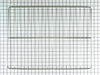
I needed another oven rack. It came with two. Now I have three.
I cut the box open with a utility knife and removed the grill. I then opened the oven door and rearranged the two existing racks so that the third one would go in so they all have the same distance between each of them. I slid the new rack into position. It didn't go in smoothly though as I had to push it in and out several times so that it would line up perfectly. Finally in went in all the way. Then I closed the oven door and went and sat down to think about the wonderful job I just did.
Parts Used:
-
Frank from N ROYALTON, OH
-
Difficulty Level:Really Easy
-
Total Repair Time:Less than 15 mins
6 of 9 people
found this instruction helpful.
Was this instruction helpful to you?
Thank you for voting!
Oven Wouldn't Heat
-
Russell from Yuma, AZ
-
Difficulty Level:Really Easy
-
Total Repair Time:30 - 60 mins
-
Tools:Pliers, Screw drivers, Socket set
7 of 13 people
found this instruction helpful.
Was this instruction helpful to you?
Thank you for voting!
old one did not fit right
took the old one out and dropped the new one in, replaced the electric burner and done
thw worse part was paying as much for s&h as i did for the part itself
thw worse part was paying as much for s&h as i did for the part itself
Parts Used:
-
Pat from PALM BAY, FL
-
Difficulty Level:Really Easy
-
Total Repair Time:30 - 60 mins
4 of 4 people
found this instruction helpful.
Was this instruction helpful to you?
Thank you for voting!
oven would not heat
I removed the 4 hex head screws holding the control panel , then the other 4 slotted screws. Disconnected all wires being careful to keep track of the color coding. Had a little trouble with the adhesive holding the face plate( I don't know why they even used it). Put the new panel in and reconnected it. Re set circuit breaker and tried the oven. It still wouldn't heat. it wasn't the control panel, but a burned out wire connecting the element in the back of the oven. Well, anyway I learned how to do the job and the the new panel activates better, so all was not lost.
Parts Used:
-
Jim from Williamsburg, VA
-
Difficulty Level:Easy
-
Total Repair Time:1- 2 hours
-
Tools:Nutdriver, Pliers, Screw drivers
5 of 8 people
found this instruction helpful.
Was this instruction helpful to you?
Thank you for voting!
OVEN CLOCK CONTROL MALFUNCTIONED
I turned off the circuit breaker and unplugged the stove. I removed the back panel and marked the location of the wires on the new oven clock control. I detached the wires and removed the old card. I installed the new one and reconnected the wires. I plugged the stove and turned on the circuit breaker. All the lights came on and the oven worked fine. I reinstalled the back panel and it took me less than thirty minutes to complete the job.
Parts Used:
-
Gregoire from N CHESTERFLD, VA
-
Difficulty Level:Really Easy
-
Total Repair Time:15 - 30 mins
-
Tools:Pliers, Screw drivers, Wrench set
3 of 3 people
found this instruction helpful.
Was this instruction helpful to you?
Thank you for voting!
blew out board by crossing wires..mistakenly toke out bulb assembly to replace bad bulb
Turne off power to range..pulled oven out..Took top back panel off with nut driver. 4screws .. Took picture of control board....removed bad control board with Phillips driver...4 screws....installed New board...removed 1 connection at a time and replaced in New board..Turned power on to test new board...check picture to make sure connections are correct...turn off power...put back panel back on...put range back in place...turn power back o n...done ..approximate time 15 to 20 minutes..
Parts Used:
-
Ken from CALABASH, NC
-
Difficulty Level:Very Easy
-
Total Repair Time:15 - 30 mins
-
Tools:Nutdriver, Screw drivers
3 of 3 people
found this instruction helpful.
Was this instruction helpful to you?
Thank you for voting!