Your coupon for will be reflected when you check out!
✖
Your coupon for
✖
Hello!
You're visiting the PartSelect site in U.S.
Would you like to shop on the Canadian site?
Stay on this site
Go to Canadian site
✖
Model Number Locations
1Select Category Type
Select Category Type
2Select Product Type
Select Product Type
3Select {MODEL} Type
Select {MODEL} Type
Sample Model Number Tags
Model numbers can be made up of numbers (1005400, for example) or a combination of letters and numbers (LAT1000AAE). The model number will most likely appear on either a paper sticker or a metal plate. Your appliance's model number tag may look similar to the sample model number tags shown here (model number highlighted in yellow):
Model has been saved to My Models. If you're not signed in, your lists are available on this device and will expire within 30 days.
Model has been saved to My Models.
This genuine OEM microwave turntable tray is a circular plate made of glass and has a diameter of approximately 16 inches. It rotates food in your microwave oven, so that your food cooks evenly. It is...
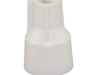
This genuine Whirlpool Microwave Inlet Cover, also known as a waveguide cover, plays a critical role in maintaining the longevity of your microwave. Specifically designed for Whirlpool, this cover dil...
This microwave door interlock switch is a critical safety component designed to prevent the appliance from operating when the door is open. It functions by detecting the door’s position—open or closed...
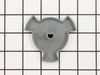
This roller is located underneath the glass turntable. With the help of the motor, this roller helps to rotate the glass tray. This part takes the place of the coupling.
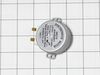
Introducing the Whirlpool Turntable Motor, an essential and authentic OEM part designed to maintain the performance of your microwave oven. This turntable motor is skillfully engineered to rotate the ...
This electronic control board serves as the central command unit for microwave operation, managing key functions such as cooking time, power levels, and defrost cycles. It receives input from the user...
Ask our experts a question about this model and we'll get back to you as soon as possible!
3 questions answered by our experts.
Sort by:
< Prev
1
Next >
Search filter:
Clear Filter
Your search term must have 3 or more characters.
Keep searches simple. Use keywords, e.g. "leaking", "pump", "broken" or "fit".
Sorry, we couldn't find any existing answers that matched.Try using some different or simpler keywords, or submit your new question by using the "Ask a Question" button above!
Donald
February 28, 2024
How do I change the interior light bulb AND can i purchase the bulb from you?
For model number KBMS1454RSS0
Hi Donald,
Thank you for your question. Before beginning this repair, turn the power off at the circuit breaker. To replace the light bulb, you will need to pull the microwave out. First, unthread the screws on each side of the control panel and pull the panel off and disconnect the small white plug at the control board and lift it up to provide access to the upper vent grill. Use a screwdriver to remove the screws securing the upper vent grill. Then use the screwdriver to remove the screws securing vent grille and take this opportunity to clean it. Then remove the screws that hold the microwave at the bottom and pull the microwave out of the mounting frame by a few inches. Then remove the insulation plate and continue to remove the microwave until you can reach the light bulb socket in the center. Squeeze the retainer spring one side at a time and release it. Then remove the light bulb from the reflector and pull it out of the socket. Then install the new light bulb into the socket. Place the retainer spring on and install the socket into the reflector. Slide the solid end of the retainer spring into the opening and lock in the split end. Check and make sure that the reflector is positioned correctly and place the insulation plate on the top and slowly slide the microwave in. Slide the grommet into its place. Then install the top vent grill and secure it with the screws. Then bring the control panel down and reconnect the white plug at the control board. Then slide the control panel so the top slots in the corner overlocks the vertical posts to the rubber grommets. Then close the door and secure the sides with the screws. Then secure the microwave on the bottom with the screws. Then install the vent grill on the bottom with the screws. Restore power to the microwave and the repair is complete. We hope this helps!
Was this helpful?
Thank you for voting!
Stephen
January 18, 2025
The control panel does not work. WhwnI press the START button nothing happens.Also, part of the numbers on the LED screen are missing
For model number KBMS1454RSS0
Hello Stephen, thank you for contacting us. Based on our understanding of the issue, we would suggest checking the control board, part number PS986338, to solve the problem. We hope this helps.
Experiencing intermittent operation. I found the right hand door switch does not depress as the left does. How can this be replaced?
For model number KBMS1454RSS0
Hello Bill, thank you for contacting us. To replace the right-hand door switch, part number PS2338920, you'll need to follow these steps. Open the microwave door and take out the racks and support. Use a Phillips screwdriver to remove the two screws holding the mounting flanges to the cabinet. Remove the screws on microwave top, lift the top panel slightly, slide it forward and take it off. Now, remove the right side panel. Unscrew it and detach the panel. Pull back the little retaining tabs to release the faulty switch from its holder and replace it. We hope this helps.
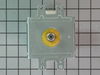
My microwave began suddenly making a loud harsh humming noise while cooking food. I did not let it go on long enough to know if it cooked the food or not. I did some Internet research and learned that it was likely the Magnetron. The test for this was to run the microwave for at least a minute on the lowest power setting and see if the no
... Read moreise cycled on and off. It did, so I (actually, my wife) ordered the part from partselect.com using the model number. I was successful in replacing the part, and we are back to microwave popcorn and quick defrost for a price that was less than a service call, however, it was time consuming, required a large work area, and access to 5 out of 6 sides of the unit. So proceed at your own discretion
Caution:
The first thing in every set of repair instructions was to discharge (short-circuit) the capacitor, as it may store large (as in lethal) amounts of electricity even when it is not connected to a power source. I had never done this, but found these instructions:
“Discharging your microwave's capacitor is absolutely essential in preventing injury to your microwave, your tools, and yourself. A capacitor stores a large amount of electricity even when your microwave is unplugged, and it must be discharged before beginning any repair. A capacitor is discharged by creating a short circuit between each of the two capacitor terminals, and between each terminal and the chassis. The chassis is the metal mounting (bare metal surface) of the capacitor. Read these directions thoroughly before you proceed. With your microwave unit unplugged, touch the blade of a well insulated screwdriver to one terminal. Gently slide the screwdriver forward until it reaches the other terminal, holding it there for a few seconds. Be aware that this often results in a loud and startling 'POP'. Repeat this procedure in order to create a short circuit between each capacitor terminal and the chassis (bare metal mounting plate surface). This same method can be applied to a capacitor having three, and not two, terminals.” I had not run my microwave in over a week, and then while my part was shipping, left my microwave 'unplugged' for more than two days, and my capacitor apparently discharged itself, although I did go through the above procedure carefully and completely - just in case. Step-By-Step: 1. You must remove your microwave from the cabinets - it is impossible to repair otherwise. This is best accomplished with 2 strong people - my wife and I made it work, but wished for another guy. a. While supporting the microwave, remove the two screws coming down through the cabinet above. b. Lift the rear of the microwave as much as possible, then tilt the front down - there is a clip high on the left side, as well as the hinge/clips on the bottom. c. If you do not lift it off the wall all at once, you may have to lift the rear even farther to remove it from the hinge/clips on the bottom. Important Note: Always beware of the microwave door, if it is bent or broken and cannot retain a seal, the microwave not function as a safety feature to keep from releasing microwaves. 2. Remove the vent cover on the top/front of the microwave - be careful, it's plastic. 3. Remove the vent cover and light panel on the bottom of the microwave - this is several screws and some simple wire clips. 4. Remove the "shell" (top and sides) of the microwave - this is several more screws on the back. Make sure to remove the plate that is holding the cord in place on the top. 5. Remove the interface panel by the screws on the top (which had been hidden by the vent cover) - the wires can remain attached, just slide it aside. 6. Remove the metal cover on the right side at the rear; this will expose the Magnetron and the Capacitor. Remember to immediately test and discharge the capacitor!
7. After you discharge the capacitor, remove the other cover plate and the support bracket - in case you haven't noticed, this is a time and space consuming operation.
After popping the last few kernals of popcorn, we hear a different kind of pop sound come from our microwave oven. When we looking inside, we found that the glass turntable had broken unevenly in half. Although we didn't understand why it had happned, we did know we'd be without the use of the microwave without a new one. After less th
... Read morean 10 minutes surfing online, I had found the correct part on PartSelect.com and had arranged to have it shipped to me by speedy delivery. Once it arrived, I just popped the new turntable into the microwave and used the box to dispose of the broken one. It could not have been easier and it saved me the cost of a service call and likely further delay.
1)Power off 2) Remove frame covering front timer display - screw on the bottom 3) unscrew time display - 4 screws 4) unsnap lamp spring clip 5)replace lamp