Your coupon for will be reflected when you check out!
✖
Your coupon for
✖
Hello!
You're visiting the PartSelect site in U.S.
Would you like to shop on the Canadian site?
Stay on this site
Go to Canadian site
✖
Model Number Locations
1Select Category Type
Select Category Type
2Select Product Type
Select Product Type
3Select {MODEL} Type
Select {MODEL} Type
Sample Model Number Tags
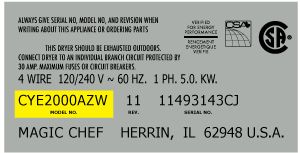
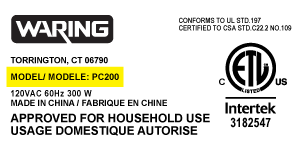
Model numbers can be made up of numbers (1005400, for example) or a combination of letters and numbers (LAT1000AAE). The model number will most likely appear on either a paper sticker or a metal plate. Your appliance's model number tag may look similar to the sample model number tags shown here (model number highlighted in yellow):
JVM7195SK1SS General Electric Microwave - Overview
Save your modelModel Saved!
Save your model for later to make things easier.
Model has been saved to My Models. If you're not signed in, your lists are available on this device and will expire within 30 days.
Model has been saved to My Models.
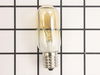
This light bulb is a 40 watt, 130-volt clear appliance light bulb that is manufactured to fit microwaves with small-base light bulb sockets. The light bulb illuminates the inside of the microwave whil...
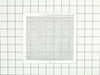
This is a replacement grease filter for your microwave. Sometimes known as the air filter, this part fits underneath your microwave and catches grease. As a result, your grease filter can become clogg...
This light bulb socket that is used in microwaves. The socket is meant to fit small-base light bulbs. * Please note: The light bulb is not included with this part and is sold separately. If the follow...
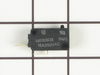
The secondary door switch is a simple on/off mechanism that stops the microwave from operating when the door is open (normally opened). The switch monitors the door latch position, and communicates w...
The microwave glass light lens protects the light bulb inside the appliance. It is clear in color and measures approximately 6-1/2 inches long, and 2-1/2 inches wide. You may notice that this part is ...
This charcoal filter is used to prevent odors and smells from your microwave from being released into your home. If your microwave smells bad or is produce an abnormal or unnatural smell, this filter ...
Unplug your microwave before attempting this repair. You will need to remove the grill, which is held into place by two screws at the top of the grill (open your microwave door before doing this). Rem...
Ensure the secure installation of your GE microwave with this effective mounting bolt. Designed by esteemed manufacturer GE, this handy microwave part ensures your appliance remains firmly in place wi...
Ask our experts a question about this model and we'll get back to you as soon as possible!
10 questions answered by our experts.
Sort by:
< Prev
1
2
Next >
Search filter:
Clear Filter
Your search term must have 3 or more characters.
Keep searches simple. Use keywords, e.g. "leaking", "pump", "broken" or "fit".
Sorry, we couldn't find any existing answers that matched.Try using some different or simpler keywords, or submit your new question by using the "Ask a Question" button above!
Ellen
November 9, 2022
Which bulb fits the jvm7195sklss microwave
For model number JVM7195SK1SS
Hi Ellen, thank you for your inquiry. We have researched the model you have provided and have found that the part you are looking for is part number PS247209. If you require assistance placing an order, please contact customer service. We hope that helps!
I am trying to find the correct part number to replace the charcoal filter for my microwave oven. Serial number for reference sg235532b. Thank you.
For model number JVM7195SK1SS
Hi Rudy,
Thank you for your question. The part number listed under your model number for the charcoal filter is PS7783258. To place an order for the part you may order it either online, by visiting our live chat sessions, Monday to Friday from 8AM to 4PM EST, or by calling our customer service line at 1-888-738-4871 and anyone will be happy to assist you. We hope this helps. Thank you and have a great day.
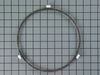
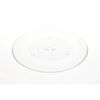
I need the following replacement items: 1. Glass cooking tray and 2. Guide roller assembly
For model number JVM7195SK1SS
Hello Althea, thank you for reaching out. The glass tray you are looking for is part number PS250009, and the glass tray support is part number PS12296714. Glad to be of assistance!
When you open the door on the right inside there is a board screwed in with one screw do i remove it or leave it,
Thanks
Miles
For model number JVM7195SK1SS
Good Day Miles. Thank you for your question in regards to your unit (Model Number JVM7195SK1SS). Is there a specific part that you are trying to replace that would require you to remove the board? If so, what would it be? Best Regards.
Did this question help you?
Thank you for voting!
Todd
November 11, 2021
What would make it not heat all the time
For model number JVM7195SK1SS
Hi Todd,
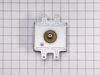
Thank you for your question. If your microwave is not heating, there are some parts that you will need to check to see which one is causing the issue. You will need to check the magnetron, the diode, and the door switches. You will find the information on how to test these parts under Free Repair Help and Instant Repairman on our website. We hope this helps! Good luck with the repair!
Noted on partselect.com that someone else with this problem, found it to be secondary door switch. There are three door switches in this model, but online info noted that one of the three might feel "soft" (in my case, one switch clicked in a rather "jiggly" way, the other two were strong decisive clicks.) To access the door switches on
... Read more this model was the only difficult part. First use a torx bit to remove the two torx screws below the latches inside the microwave. This frees the latching part inside, that holds the door switches, which you will remove after you take off the control panel. The top grill has to come off before you can remove the door panel. Remove the screws above the grill, on the microwave top cover, The grill on this model is covered with a panel that moves out when it vents. After removing the two top screws, the covered grill vent slides left to remove. Be careful, as the sliding tabs are plastic. Wiggle and jiggle it, to slip it off. Below the removed grill, is a small metal grill with one screw in lower center. Remove that screw, and wiggle that out. You'll then see the one screw that holds on the control panel. Remove this screw, and lift the control panel up to remove. Again, go slowly and gently, as the bottom tabs holding the control panel in, are also plastic and easily broken. Lay the control panel on something, (I used the coffee maker) and pull out the wire bundles tucked on the left, that are attached to the latching panel. Wiggle the latching panel gently to lift it up off of it's plastic tabs and pull it out towards you, so you can see the three door switches. Each switch (part number WB24X829) has a little black switch on it. Feel each switch with either your finger, or a screwdriver to see which one doesn't "click" strongly. The weak one is the one you will replace. The door switches are fitted into a tab, and plugged into their wires. Remove the defective switch, pull out the wires, and replace it with the new switch, plugging back the wires, and slipping it back into it's plastic tabs. Then put everything back together in reverse order. The entire job took me fifteen minutes EXCEPT for figuring out how to slide off the upper grill, which I have told you. A repairman would have cost $150, the part was $18. AND, there's a good chance, the other two switches will get "used up" in the next year or so as well, so I'll be ready next time. Thank you, Partselect, why work all day, to make money, only to give it to somebody else, for fifteen minutes of work. All I needed was the knowledge.
Above the stove mounted microwave. I dropped the lens cover from under the bulb and tried to remove the bulb. The bulb separated from the base. I tried to remove the base with a pliers and the lamp socket broke. I ordered the parts and dropped the bottom cover of the unit down (5 screws). Removed 1 screww from the lamp socket, unplugged t
... Read morehe wires and took it out. Simply replaced socket, fastened bottom cover of microwave, installed new bulb and closed lens cover.
At first I tried to use pliers to unscrew the base,very uncomfortable working position,upside down and backwards(the microwave is installed over the range top)very limited space for your body and arms to manuver and you really cant see the base,all of this took place after the breaker was turned off ofcourse,finally figured out that you c
... Read morean drop the entire bottom housing of the microwave by unscrewing 6 screws and the light sockets are easily accessable once you lower it,take out 1 retaining screw ,remove the entire socket and unscrewed the broken base and replaced the bulbs,I said bulbs,there is no sense in having to replace another bulb in who knows how long since only one had burned out but they were both the same age