


 My Orders




Water Filter FAQs
Search Filter:
✖
Clear Filter
Sorry, we couldn't find any existing answers that matched. Try using some different or simpler keywords.
Your search term must have 3 or more characters.


Finding Your Water Filter
Where is my water filter located?
Use our Water Filter Finder to find the filter location and appropriate water filter for your refrigerator model.
Here are some common locations to check:
- Behind the refrigerator - This is usually an in-line filter that is housed in the interior of the back of the refrigerator. The built-in fitting connects directly to the water supply line.
- In the bottom grille (left or right side) – these are usually push-button filters that eject when the filter cartridge is pressed, or a quarter-turn type that is removed by twisting the knob.
- Upper right interior – may be concealed inside a drop-down compartment or has a cover that needs to be flipped open.
- Upper left interior – may be concealed inside housing and removed by twisting or pushing on the filter.
- Lower left/right interior – these are usually removed by a push button/push tab to eject or by twisting the filter.
- Lower center interior – usually a twist to remove method.
Will this water filter fit my appliance?
It is extremely important and necessary to order the correct water filter for your refrigerator model. Installing the incorrect water filter could cause damage to the system and a water filter that does not work as it should.
Using your model number to purchase the correct water filter will also save you time, money, and the hassle of needing to make a return. There are three different ways to search for the water filter that fits your refrigerator:
- Refrigerator Model Number Search: Type your refrigerators model number in the model number search box located at the top of this page in the header. This will bring you to a page where you can search for your water filter in a few different ways. Since you know the part you need, simply type “water filter” in the “Find Part by Name” search box. This should bring you to a page where you can select the water filter for your appliance and “Add to Cart” to purchase.
- Water Filter Part Number: If you have located the water filter in your refrigerator, often the part number can be found directly on the filter itself or on a label on the filter. A part number often consists of letters, numbers, or a mix of both. Use this complete part number to search in the search box located in the header of this page to find the exact OEM match.
- Water Filter Finder search: If you are not sure what the model number is for your appliance, use our Water Filter Finder search tool. This search method is done in five easy steps. You will begin by selecting the brand of your appliance, then your refrigerator style (bottom freezer, side-by-side, etc.), the filter’s location, and the removal method of your filter. You will then be directed to the fifth and final step where it provides the appropriate water filter for your appliance.
Once you have selected the water filter for your refrigerator, you will get the option to sign up for a subscription for free shipping on that order and future water filter orders.
What type of water filter do I need?
- Refrigerator Water Filters: provides filtered water for ice makers and in-door water dispensers in refrigerators.
- Under Sink Water Filters: these filters are installed underneath the sink and filters the water before it reaches the faucet.
- Whole House Water Filters: these filters connect to the main water supply line and filters all water throughout your home including, showers, washing machines, dishwashers, and taps.
refrigerator is outdated and did not come with a built-in filter, how can I get one?
Any inline filter can be used on any refrigerator to filter water for the icemaker and dispenser. It is installed by cutting the 1/4-Inch water line supplying water to the appliance. See FAQ question “How do I install an inline water filter to my refrigerator”.

Water Filter Maintenance & Care
When should I replace my water filter?
Manufacturers recommend that you change your filter every six months with regular water usage. If you use your water dispenser more than average or have poor water conditions due to your location, it may need to be changed more frequently.
Other signs you may need to replace your filter:
- Water filter indicator is red or has a message to replace the filter
- Water/ice has an odor
- Water/ice tastes bad or has changed
- Water/ice is discolored
- Water contains floating particles
- The flow of water has decreased or stopped
- Ice maker is not making ice
Why is it important to change my water filter?
Failure to change your filter at least every six months will allow contaminants to overfill your filter, causing it to leak these potentially toxic chemicals back into your drinking water. With an outdated filter, your water may even contain more pollutants than unfiltered water. Changing your filter infrequently can also reduce the water pressure in the filtering system and can lead to a buildup of lime scale which can wreak havoc on your appliance. Not to mention, an expired filter could cause a change in taste and odor.
Do unused water filters expire?
No. You can store replacement filters as long as they are kept dry. If you do not have the storage space or would rather purchase them as you need, we offer a water filter subscription that offers the convenience of water filters delivered right to your door when you need it, with no cost to ship.
Do I need to lubricate the gaskets on my filter?
Most water filters do not require any lubrication. If you want to lubricate the O-rings on your filter or if the manufacturer suggests doing this, be sure to use a food grade silicone lubricant.

Water Filter Functions & Features
How does a water filter work?
- Fiber water filters are constructed with firmly wrapped fibers made of rayon or spun cellulose, which block rust, lead, and other residues commonly found in drinking water.
- Carbon water filters are made of granulated activated carbon or solid carbon block filters. Carbon can absorb numerous chemicals found in drinking water. Charcoal is a form of carbon and it absorbs an abundance of compounds, some that can be poisonous.
- Granular activated carbon (GAC) is used to trap chemicals and contaminants that can cause unpleasant taste and odor. Solid carbon block filters are a more recent innovation that are even more absorbent. It takes longer for water to pass through carbon blocks than carbon granules.
What do water filters remove?
As water travels, it picks up impurities and contaminants both from the natural environment and from cities, homes, and farms. Water that has not been filtered can contain minerals, chemicals, bacteria, and microscopic organisms that can create an unpleasant flavor and, in some cases, can cause potentially harmful illnesses. To know exactly what your water filter removes make sure you read the label of your filter carefully. If it is NSF Certified, you can search NSF’s database to understand what your model is certified to protect against.
What does NSF Certified mean?
NSF stands for National Sanitation Foundation. The NSF mark is assurance that your filter has been tested by a trustworthy impartial certification organization and all of its contaminant reduction assertions are truthful and correct. PartSelect.com only sells NSF certified water filters.
Are filters for only drinking water or ice too?
Water filters filter the water entering the appliance for both the ice maker and water dispenser.
Does my water filter need to be OEM or can I use a generic brand?
PartSelect only carries Original Equipment Manufacturer parts. Purchasing an OEM water filter means you are getting the correct filter that is guaranteed to fit your refrigerator. OEM filters ensure the highest performance filter for your appliance by removing more contaminants than a generic brand. Purchasing a generic brand runs you the risk of encountering more problems and secondary repairs.
Aftermarket filters are not made by the refrigerator’s manufacturer. They are made by independent companies that design filters meant to imitate the original filters fit and performance. Non-OEM water filters are generally cheaper because some are made with cheaper materials that do not perform as well. Non-OEM water filters can also cause problems such as poor water flow, water dispenser malfunctions, water and ice having an unpleasant taste, contaminants leaking into your drinking water, and your refrigerator leaking.
What is in my water?
City Water
- Chlorine and chloramines – used by municipalities to filter and decontaminate water. These substances can create a bad taste and odor to your drinking water.
- Fluoride – added to your water for oral health and the prevention of germs.
- Metals and other contaminants – as water is carried through the pipes in your home it can pick these up.
Well Water
Well water is not required to abide by specific water guidelines. It is the owner’s responsibility to test the well at least once a year (depending on your local conditions) due to continually fluctuating ground conditions. These contaminants are not necessarily present in your well water, but are some common examples:
- Arsenic: tasteless and odorless, but can cause damage to your nerves, heart, skin and blood vessels.
- Metals: has a rusty color and odor and produces a metallic flavor to your water.
- Nitrates: tasteless and odorless but can cause brain damage in infants.
- Silt and Sediment: particles noticeable in your water and a cloudy consistency.
- Coliform Bacteria: invisible, related to E-coli.
- Hard water: can cause dry skin and can cause damage to your appliances.
- Cysts: can cause stomach discomfort.
- Lead: tasteless and odorless and can cause nerve damage and high blood pressure.
- Chemicals: atrazine, benzene and lindane.
- Pharmaceuticals: picked up through waste stream.
Should I test my water?
If you are using municipal water, it is best to contact your water supplier and ask for a water quality report. If you are using well water, it is important that you are monitoring the safety of your own water. You should be testing your water at least every spring, if not more. What you should be testing for can change over time and depends on your specific environmental conditions. Contact your local government for more information on what to test for and services provided.
Does filtered water make my refrigerator last longer?
Most water supplies have small particles and chemicals such as chlorine. These small particles can hinder the mechanical operation of your equipment, which can lead to premature valve failure and nozzles getting plugged far sooner than necessary. A common chemical, such as chlorine can be corrosive and damage metal components. By filtering these impurities, it reduces the risk of limescale build-up, which can also be damaging to your equipment over time.
What are activated carbon filters?
Many NSF-certified filters use activated carbon filters to reduce and eliminate pollutants from drinking water, which can include chlorine, pharmaceuticals, chemicals, metals (lead and mercury), among other contaminants, that can make your water have a bad taste and smell.
This method of filtering uses activated carbon on a large surface to remove these impurities. It does this through absorption. Absorption soaks up particles to its surface like a magnet. Debris bonds or attaches to the surface of the carbon filter because water and contaminants are polar compounds that attract. The large and porous surface area that carbon filters have makes them efficient in minimizing poor taste, odor, and other particles found in water.
The pores that make up the filter are measured in microns. The smaller the micron, the finer the filtration capacity. The slowdown in flow rate gives pollutants time to attach to the carbon. Another feature of activated carbon filter is that they allow healthy minerals such as ions, fluoride, calcium, and magnesium, to by-pass the filter and still make its way into your water.
Sometimes carbon filters are referred to as charcoal filters, however there are different types of material that these filters can be made up of:
- Bituminous coal – no longer used as often.
- Wood-based media – made from burned wood.
- Coconut shell media – made from the shell of a coconut and is the most renewable.
What is whole home filtration?
Reduces sediment, sand, rust, and other impurities at the main water supply. This makes it so there is less build up inside water heaters, pipes, dishwashers, and other appliances.
What is a micron rating, should it be low or high?
A micron is a unit of measure that is equivalent to one thousandth of a millimeter. Micron ratings are used in water filtration to describe the size of particulates (salt, sand, and sediment) that can be filtered from your water. A higher rating means it can remove larger particles only. A lower rating can remove smaller particles as well as larger ones. The micron rating that is best for you depends on your water conditions and how often you want to change your filter. If your water does not contain a lot of sand or sediment, a mid to low micron rating will remove more impurities, providing cleaner water. If your water contains an excess of sand and sediment, a mid to low micron rating will clog much faster and will need to be replaced on a more regular basis.
What is a water filter bypass plug?
Many modern refrigerators have built-in water filters, but if you do not need or want to use the water filter, a bypass plug must be used in its place. If a bypass plug was not supplied with the refrigerator or has been misplaced, you can order one on PartSelect.com by entering in your model number in the search box on the home page.
What is Gallon Capacity?
This is the number of gallons of water that the filter can clean before it needs to be replaced with a new one. The gallon capacity of your filter will be located with the instructions that come with your filter.
What is PSI Range?
PSI measures the force of water flow that runs through your refrigerator’s pipes. The PSI range must be compatible between the refrigerator and filter for it to work properly. The PSI specification can be found with the instructions that come with your new filter.

Water Filter Troubleshooting
Why is my water filter indicator still flashing red after I replace my filter?
If you have just replaced your filter and the indicator light is still flashing red, or is still indicating a need to replace your filter, it needs to be reset. Generally, this is done by pressing and holding the button down for a few seconds. For more information check your user manual for instructions specific to your model.
Why has water flow decreased or stopped? Do I need a new filter?
Carbon block filters have a lower flow rate and pressure to give pollutants time to attach to the carbon. However, If the water is dispensing slower than usual or not at all, this could be due to a clogged or partially clogged water filter. To confirm that this is the issue, remove the filter and install the bypass plug. Activate the dispenser. If the flow of water improves, it is likely a backed-up filter that needs to be replaced. Use our Water Filter Finder search tool to find the one you need and get it replaced as soon as possible.
If you need a bypass plug because one was not supplied or it has gone missing, use your model number to search for the compatible bypass plug for your refrigerator.
Other possible reasons:
- Check the connection at the bottom of the freezer door to ensure the nuts are tight.
- Check the lines going to the water reservoir to make sure the connections are right (you'll find the connections in the back of the unit behind the black sound damper).
- Check to see if the water pressure is too low. It should be at a minimum of 20 psi.
For more information on how to perform this repair or to troubleshoot other possible parts that could be causing this issue, please check out our repair center.
Why does the water taste bad after replacing my water filter?
Most refrigerator water filters are made of carbon, which can leave behind a carbon residue in the first couple gallons of water. This can cause a bitter taste and texture in your water. It is important to remember to flush the first couple gallons of water after replacing the filter. This will get rid of the carbon residue as well as any air that is caught in the system. Discard the water or use it to water plants.
Why do I need to change my filter every 6 months? My water tastes and looks fine.
A lot of harmful pollutants are unnoticeable - they do not have a taste, color, or odor (such as lead). Filters have a capacity, like all filters, and once it has reached capacity it is no longer able to remove those harmful impurities from your water.
Why is my water filter leaking?
- A non-OEM filter can cause leaks or damage to your appliance.
- Remove the filter and check for cracks or any noticeable damage. If it is cracked or damaged, you will need to replace it with a new one.
- Inspect the O-rings at the top of the filter. If they are damaged, then a reliable seal can not be formed, and leaking will occur. In this case, the O-rings will need to be replaced.
- Check the housing that the filter plugs into for any signs of damage.
- Check to make sure the filter is properly installed in the housing. Some filters have markings to indicate the correct alignment.
- Check the water inlet valve (check for damage or test with a multimeter).
- Check to make sure the water lines are secure.
- Check to make sure the air vents are not being blocked. This can cause the refrigerator to overcool and if this lasts too long it can cause the water filter to break and water to leak.
My icemaker isn't making ice, is this because I need to change my water filter?
A clogged water filter is one of the causes of your icemaker not producing ice. A dirty filter limits the amount of water that flows into the icemaker preventing it from making ice. Make sure you are changing your filter at least every six months, if not more, depending on if your area is more susceptible to hard water. For more information on how to perform this repair or troubleshoot other possible parts that are causing this issue check out our repair center.
Why isn't the water dispenser on my side-by-side refrigerator working?
- Check the water supply to make sure it's turned on.
- Check the water pressure. If it's too low, the dispenser won't operate.
- Make sure the lock switch which prevents the dispenser from working, is turned OFF.

Water Filter Installation and Removal
Quarter-turn Knob (Interior)
How to change a quarter-turn knob filter inside of your refrigerator
-

- These filters have a reusable knob, look for this knob on the interior of the refrigerator.
- Hold the knob while turning the filter ¼ of a turn to the left.
- Take off the cap and save it. Dispose of your old filter.
- Take protective coverings off the O-rings of your new filter.
- Place cap back on new filter.
- Insert the new filter and turn the knob ¼ turn to the right until it locks in place.
- Run two to four gallons of water through the new filter to flush the system of air bubbles and residue.
- Reset water filter indicator if applicable.

Drop-down tray
How to Change Filter in a drop-down tray inside of your refrigerator
Please Note: Instructions apply to both push and pull release
-
- If the cover is labelled “Pull”, pull it forward. If it is not labelled, try pushing the tab down and pull forward.
- Remove the filter by turning it to the left. Drain water and discard.
- Take protective coverings off the O-rings of your new filter.
- Install your new filter by turning it to the right.
- Reattach the cover.
- Run two to four gallons of water through the new filter to flush the system of air bubbles and residue.
- Reset water filter indicator if applicable.

Flip door
How to change a flip-door filter inside your refrigerator
-
- If the cover is labelled “Pull”, pull it forward to open. If it is not labelled, push the tab inward and down, and pull forward.
- To release the filter, turn it to the left. Drain the water and discard.
- Take protective coverings off the O-rings of your new filter.
- Install your new filter by turning it to the right.
- Reattach the cover.
- Run two to four gallons of water through the new filter to flush the system of air bubbles and residue.
- Reset water filter indicator if applicable.

Short-stemmed twist filter
How to change a short-stemmed twist filter inside your refrigerator
-
- Locate the filter in the interior refrigerator compartment (left or right side).
- You may need to remove some shelving to gain access to it.
- Pull it down and turn it counter clockwise to disengage it.
- Remove any protective coverings from the O-rings.
- Align the tabs of your new filter so they are in the horizontal position.
- Push the new filter into the holder, twisting it until it is secure.
- Run two to four gallons of water through the new filter to flush the system of air bubbles and residue.
- Reset the water filter indicator if applicable.

Push filter
How to change a push filter inside your refrigerator
-
- Look for the filter on the interior of the refrigerator compartment.
- Push firmly on the filter to disengage it from the housing.
- Dispose of old filter.
- Take protective coverings off the O-rings of your new filter.
- Push into the housing until it clicks into place.
- Run two to four gallons of water through the new filter to flush the system of air bubbles and residue.
- Reset water filter indicator if applicable.
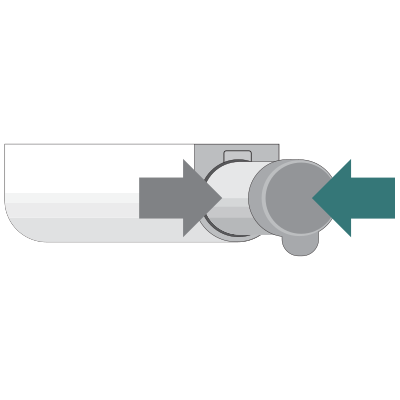
Eject-button (base grille)
How to change an eject-button filter in the grille base of your refrigerator
-
- Look for the knob at the base of the grille and leave it intact.
- Press the button beside the filter. This will disengage the old filter so you will need to hold on to it.
- Pull the filter out and remove the knob. Save the knob and dispose of your old filter.
- Take protective coverings off the O-rings of your new filter.
- Align the arrows on the new filter and knob. Turn to the right to lock.
- Push the new filter back in until the eject button engages again.
- Run two to four gallons of water through the new filter to flush the system of air bubbles and residue.
- Reset water filter indicator if applicable.
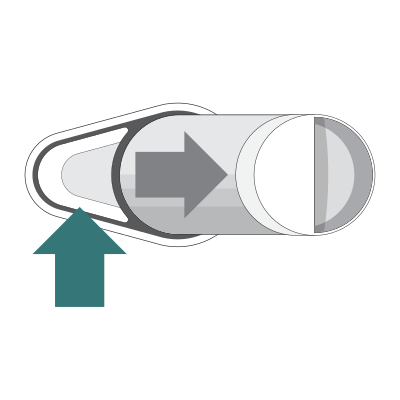
Quarter turn knob (base grille)
How to change a quarter-turn knob filter in the base grille of your refrigerator
-
- These filters have a reusable knob, look for this knob at the base of the grille
- Hold the knob while turning the filter ¼ of a turn to the left.
- Take off the cap and save it. Dispose of your old filter.
- Take protective coverings off the O-rings of your new filter.
- Place cap back on new filter.
- Insert the new filter and turn the knob ¼ turn to the right until it locks in place.
- Run two to four gallons of water through the new filter to flush the system of air bubbles and residue.
- Reset water filter indicator if applicable.
Why do I need to flush water through the filter before use?
A lot of filters are carbon-based and will need to have water run through them to flush out any excess carbon residue, which can produce a bitter taste to your water. This will also get rid of air bubbles caught in the system. Each filter will have its own flush time written in its instruction guide.
Do I need to reset my water filter indicator?
Most modern refrigerators will have a water filter indicator light used to notify you when it is time to replace your filter. Some indicator lights or messages will automatically reset once you have installed the new filter, but many do not. If the light it still flashing red or indicating the need to replace it after you have installed your new filter, this is because it needs to be manually reset.
How do I reset my water filter indicator?
Each manufacturer has slightly different ways of resetting this light. Here are a few examples of some common brands:
- Maytag/Magic Chef/Amana/Jenn-Air: Press and hold the light and lock pads until the change filter light flashes (about three seconds).
- Whirlpool/KitchenAid: Press down and release the refrigerator light switch five times within ten seconds.
- Frigidaire: Press the reset button down until the dispenser light starts to flash.
- General Electric/Hot Point: Press the reset button on the dispenser for four to eight seconds then release.
How do I install a whole home filtration system?
Before installing, determine the size of your pipes. They are usually ¾-inch or 1-inch. You will also need to decide where you will install the system, which is usually the main water line before your water heater and softener.
How do I install an inline water filter under the sink?
- Shut off the cold water line under your kitchen sink.
- Turn on the faucet to remove any water that is still in the line.
- Place a bucket under the cold water line under the sink to capture any excess water.
- Break the water connection using a wrench. Ensure the cut is straight and flush.
- Connect the adapter that comes with the kit to the hose.
- Place the black tubing into the adapter on one end and the filter on the other end.
- Connect the other adaptor to the water shutoff valve. Place the black tubing from the filter to the shutoff.
- Turn the water on.
- Run water for about 5-10 minutes or follow instructions specified by the manufacturer. This will prime the filter for use.
How do I install an inline water filter on my refrigerator (filter located behind your refrigerator)?
Some older models do not come equipped with a built-in water filter. If you would still like the benefit of healthy filtered water from your dispenser and icemaker, you'll need to install an inline water filter behind your refrigerator. This is done by installing it on the water supply tubing.
Materials Needed:
- Something to cut tubing
- Sandpaper
- Towel
- Bucket
- Gloves
- Adaptor (if needed)
- Tools for mounting the filter (if needed)
- Mounting materials (if they did not come with the filter)
Before you begin:
- Choose the filter - basic filters use activated carbon to reduce chlorine flavor, rust, and deposits. You can also choose a premium inline water filter that removes lead, cysts, and other toxic pollutants.
- Verify your refrigerator's tubing is compatible with the filter. Pull your refrigerator to gain access to the water supply tubing. Measure the diameter of the tubing connected to the back of the fridge. They are usually 1/4-inch or 3/8-inch. It is common for the water tube fittings on inline filters to fit 1/4-inch copper or plastic tubing. If the size of the filter connection tubing does not match the water supply tubing, purchase an adapter if necessary.
- Decide where you would like to mount the water filter behind the refrigerator. If your water filter kit does not come with the parts to mount it, you will need to purchase these separately.
Installation:
- Connect the mounting hardware to the desired location on the wall behind the refrigerator.
- Unplug the refrigerator and turn off water supply.
- Cut the water supply tubing. Should be a smooth flush edge, use sandpaper if needed.
- Install the adapters (if applicable) to the water tube and fit into filter.
- Ensure the water filters flow is pointed in the correct direction. Push the inlet end of the water tube into the filter. Make sure it is secure.
- Place the water filter over the bucket and release the water supply valve to allow two gallons of water to flow through. This will remove any carbon residue.
- Check for leaks.
- Turn off the water supply valve off.
- Connect the outlet tube to the filter outlet fitting.
- Open the water supply valve. Look for any leaks coming from the outlet water tubing.
- Secure the water filter to the mounting hardware on the wall.
- Reposition the refrigerator.
Can I recycle my water filter after use?
Contact your refrigerator manufacturer and ask about any recycling programs that they may offer. Make sure you have your refrigerators model number ready for when you call.
If your manufacturer does not have a recycling program, you will want to dispose of your filter properly and recycle the parts that you can. You may need to contact your local recycler to find out the level of plastic that they accept. The level of plastic of your filter is either printed on the casing or can be provided to you by the manufacturer.

Water Filter Subscription Program
How do I sign up for a water filter subscription?
Find my Water Filter
Signing up is easy. Once you have selected your water filter, you will be given the option to sign up for a subscription by selecting the cycle period best suited to your water filter needs. This will initiate free shipping on that order and free shipping on all future water filter deliveries done through the subscription.
How do I cancel my water filter subscription?
You can cancel your water filter subscription by logging into your online account or by calling a customer service agent toll-free at 1-888-260-4310 from 8:00 AM to 8:00 PM Eastern time, Monday to Saturday.
If you don’t already have an online account, you can create one by going to the PartSelect.com home page and clicking on “Your Account” and selecting “Create Account” in the drop down. Create the account using the same email address that you did when you made your order.
Once you are in your online account select “See All Subscriptions” and “Edit”. From here you can cancel your subscription, change the frequency of the subscription, change your delivery address, etc.