PartSelect Appliance Parts PartSelect Appliance Parts home pageHelp locating your model and partsView your shopping cartHACKER SAFE certified sites prevent over 99% of hacker crime.

How to replace a microwave oven's fuse:
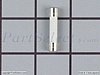


Replacing a fuse

Locate your fuse. Most microwave fuses look like the one pictured to the left. They are usually an inch or two long. Each end is metallic and the center is either ceramic or glass.

To get to the fuse, remove the outer cabinet of the unit, which is usually held in place with a few screws. Once the outer cabinet is removed, follow the power cord into the unit. It will take you to the fuse holder, where the fuse sits. The fuse holder is located two or three inches into the unit, and may be attached to a power board.

Decide if your fuse is blown. A blown glass fuse will produce flash burn marks on nearby surfaces, or it will be completely black on the inside. The internal fuse wire (filament) will be melted and blackened. Ceramic fuses give no outward signs of having blown. To determine if a ceramic fuse is blown, test it with an ohmmeter. If the ohmmeter reads zero ohms, your fuse is fine. A reading of infinite ohms means your fuse is blown.

Replace the blown fuse. Pop it out of its holder and snap in a new one. You can squeeze the fuse clips together with your fingers in order to tighten their grip. Replace the unit's outer cabinet, plug it back in, and test to see if it is running properly. DO NOT run the microwave with nothing in it.

NOTE: Fuses do not usually blow on their own. A fuse may blow because of problems with the interlock switches or with high voltage circuitry. It is also possible, though rare, that a power surge will cause a fuse to blow.


CAUTION: Your microwave oven is capable of giving you a serious electrical shock, even when it is unplugged. We strongly suggest you seek the assistance of an appliance repair technician when conducting any microwave oven repair.


FREE appliance repair advice from the pros!
Appliance Repair Forum
GE Gas range Broiler lights but not oven
Sun, 07 Sep 2008 22:14:55 GMT
Post By: lgajan
Our burners light as well as the broiler, but the main over doesn't light. We removed the door. The ignitor doesn't light. Is this something we can replace ourselves?
Ice on copper pipe, freezes food inside fridge
Sun, 07 Sep 2008 21:32:36 GMT
Post By: DotPearce
Hi Wonder if anyone can help me. My 21 month old fridge (Haier) was bought from a direct discount store. (Only had a 1 year guarantee). It has a wet spot at the side of the fridge and I have...
Temperature Reading Waaay Off
Sun, 07 Sep 2008 21:22:25 GMT
Post By: Bulldog413
Mama loves our old butane Magic Chef oven, so I have replaced several parts over the years. The clock/function display tends to fade in and out, and a new touchpad usually fixes this...
Washing machine (crosley) by maytag
Sun, 07 Sep 2008 20:48:48 GMT
Post By: meeus11
my washer is leaving gray lint all over my clothes when they are done washing .......... HELP!!!!!!!!!!!!!!!! lol can not locate a lint filter and do not have a owners manual . thanks in advance for...
WASHER WON'T SPIN-CODE-Lr
Sun, 07 Sep 2008 20:09:07 GMT
Post By: AKASURE
Washer will do everything but spin. Has an error code Lr. Called Maytag they said it was either the motor or control panel. Any way to tell for sure which one or either one? Maybe its the safety...
 
- Catalog -
Accessories
Dishwasher Parts
Dryer Parts
Electric Stove Parts
Gas Stove Parts
Microwave Parts
Refrigerator Parts
Washer Parts

Part or Model Number


- Reviews -
PartSelect has been recognized as 2007 Circle of Excellence Platinum merchant by BizRate and Shopzilla.
Check PartSelect's Outstanding rating from BizRate and read reviews from customers like you.
PartSelect is a trusted member of the Better Business Bureau
SPECIAL OFFER
Universal Range Knob Kit
Universal
Range Knob Kit

Range Knob Kit Includes
9 Knobs: (4) Surface,
(3) Selector And (2) Oven Thermo.

On sale $17.85
Save $7.65
View  Buy 

Offer expires September 30, 2008.
Price subject to change after expiry date.
SUMMER 2008
NEWSLETTER

Keep Cool This Summer
PartSelect.com has some great ideas to help you get ready for the hot summer months ahead. You can check out our 20 tips on how to keep your home cool this season without breaking the bank, find out how to get your barbeque ready for grilling and much more!
20 Tips to Keep You and Your Home Cool

Icemaker Maintenance - Keep Your Ice Fresh

Getting Your Air Conditioner Ready

Cleaning Your Barbeque

Barbeque Safety Tips


Check Your Order Status
Call PartSelect toll-free at 1-888-895-1535 from 7:00 to 9:00 Eastern, Monday to Friday, 8:00 to 6:00 Eastern on Saturdays.
Why Shop PartSelect?
Secure Shopping
Same-Day Shipping
Return Any Part
One-Year Warranty
Great Prices
Privacy Policy


Free Repair Help
Dishwasher
Dryer
Microwave
Range / Stove / Oven
Refrigerator
Washing Machine
More Resources...


FREE
NEWSLETTER
Your email address

  • Repair help
  • Special offers
  • Maintenance tips
About our newsletter

  About PartSelect  |  Contact Us  |  Privacy Policy  |  Affiliate Program  |  Resources  
  Order By Email  |  ©1999 - 2008 PartSelect.com. All rights reserved.  
  The PartSelect logo is a Registered Trademark of PartSelect Appliance Parts  
Amana Parts | Frigidaire Parts | GE Parts | Hotpoint Parts | Jenn-Air Parts | KitchenAid Parts | Appliance Repair |
Magic Chef Parts | Maytag Parts | Westinghouse Parts | Whirlpool Parts | Sears Parts | Kenmore Parts
Microwave Parts | Dishwasher Parts | Washer Parts | Refrigerator Parts | Dryer Parts | Range / Oven Parts