















JCP56*V2 General Electric Range - Instructions
Keep searches simple. Use keywords, e.g. "leaking", "pump", "broken" or "fit".
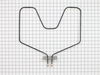
Oven Heating element broken
Turned off power to the oven at the circuit breaker. Pulled the old heating element from the back lower wall of the oven. Noted the position of the wires (right terminal attached to the red wire, left to the black wire). Removed small bolts holding the element to the wires using pliers. Attached the new element using screw driver. New element came with screws, not bolts. Pushed the element back into place and restored power. Tested to make sure everything worked. Everything works and I ran an oven cleaning cycle. Noticed that indicator light above the temperature selctor is always on now even when oven is in the OFF position. Not sure if that's related to the change or to the oven cleaning cycle I ran. In any case, oven seems to work normally.
Parts Used:
-
James from Hanover, MA
-
Difficulty Level:Really Easy
-
Total Repair Time:Less than 15 mins
-
Tools:Pliers, Screw drivers
2 of 3 people
found this instruction helpful.
Was this instruction helpful to you?
Thank you for voting!
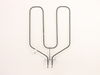
Oven wouldn't hold temp - over/under
Unplugged the range, took old elements out, put new ones in. Couldn't have been easier and for the total cost of about $60; I have a working oven again. A LOT cheaper than a new $600 range!!
Parts Used:
-
Andor from Oxford, OH
-
Difficulty Level:A Bit Difficult
-
Total Repair Time:30 - 60 mins
-
Tools:Screw drivers, Socket set
2 of 3 people
found this instruction helpful.
Was this instruction helpful to you?
Thank you for voting!
elememt not working
Hi, First unplug appliance ,remove the oven door by pulling it up from the hinges, giving room to work deep inside , remove the two screws that hold the element in place. then pull the element out carefully not to stress the wires and replace the element . Note after all is done test with an oven thermometor :)
Parts Used:
-
ROBERT from ORWELL, VT
-
Difficulty Level:Really Easy
-
Total Repair Time:30 - 60 mins
-
Tools:Screw drivers
1 person
found this instruction helpful.
Was this instruction helpful to you?
Thank you for voting!
The bottom bake element burned out.
1. Cut power off. 2. Remove old element, make sure you do not lose the screws, pull the connecting posts out and we used strings on posts so they could not get lost in the wall. 3. We then replaced the new element with little of no problems, it took approximately 30-45 minutes for the whole process.
Parts Used:
-
Pauline from DECATUR, GA
-
Difficulty Level:Really Easy
-
Total Repair Time:30 - 60 mins
-
Tools:Screw drivers
1 person
found this instruction helpful.
Was this instruction helpful to you?
Thank you for voting!
bake element burned out
took cover off back of stove. Removed two screws and wires that were attached to the element. Removed old element and installed new element. An easy repair.
Parts Used:
-
Dave from Maryville, OH
-
Difficulty Level:Easy
-
Total Repair Time:15 - 30 mins
-
Tools:Nutdriver, Screw drivers
1 person
found this instruction helpful.
Was this instruction helpful to you?
Thank you for voting!
bake element disintegrated
At 76 I no longer do my repairs so I asked my daughter's friend to do it for me.
Parts Used:
-
Susan from New Lebanon, NY
-
Difficulty Level:Really Easy
-
Total Repair Time:15 - 30 mins
1 person
found this instruction helpful.
Was this instruction helpful to you?
Thank you for voting!
Old Reliable
This range is about 30 years old and I was thrilled to still be able to get the bake element, which burned out about a month ago. I was doing research to buy a new stove when a cousin, from out of town, called to say they were going to visit the following week. No time now to get a new one installed. "partselect.com" was the fastest way. THANK YOU!
First off, I want you to know I'm an obese 56-year female without tools. But, I knew where to borrow those.
I first shut the power off to the range. I then disconnected the 2 screws that hold the element and pulled it out to reveal the 2 screws which connected the wires. I unscrewed those and removed the bake element. I double checked the stove model and bake element part # at the GE website and ordered it from "Partselect.com". It came in about 3 days. I then reversed the order of the above and it was done.
Here are some challenges I encountered..
1) The oven door was in the way making it uncomfortabe to get to the back of the stove.
2) Those $#%& screws are so short I kept dropping them.
3) The wires in the back bend easily. Be careful.
That's about it. It was a pill but not a real problem. It sure beat buying a new range before I've decided on which one to buy.
First off, I want you to know I'm an obese 56-year female without tools. But, I knew where to borrow those.
I first shut the power off to the range. I then disconnected the 2 screws that hold the element and pulled it out to reveal the 2 screws which connected the wires. I unscrewed those and removed the bake element. I double checked the stove model and bake element part # at the GE website and ordered it from "Partselect.com". It came in about 3 days. I then reversed the order of the above and it was done.
Here are some challenges I encountered..
1) The oven door was in the way making it uncomfortabe to get to the back of the stove.
2) Those $#%& screws are so short I kept dropping them.
3) The wires in the back bend easily. Be careful.
That's about it. It was a pill but not a real problem. It sure beat buying a new range before I've decided on which one to buy.
Parts Used:
-
Laura from Crofton, MD
-
Difficulty Level:A Bit Difficult
-
Total Repair Time:15 - 30 mins
-
Tools:Wrench set
1 person
found this instruction helpful.
Was this instruction helpful to you?
Thank you for voting!
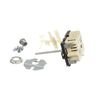
Halogen element staying on
removed the end caps from the stove panel, unscrewed the back, unscrewed the old switch, CAREFULLY noting which wire went to which terminal, removed the wires.
Reversed the process. took a little longer because I felt compelled to do a thorough cleaning while I was there.
Reversed the process. took a little longer because I felt compelled to do a thorough cleaning while I was there.
Parts Used:
-
Arthur from Indian Harbour Beach, FL
-
Difficulty Level:Easy
-
Total Repair Time:30 - 60 mins
-
Tools:Pliers, Screw drivers
2 of 4 people
found this instruction helpful.
Was this instruction helpful to you?
Thank you for voting!
element went out on oven
Made sure oven was turned off. I used nut driver to remove nuts holding old element to back of oven. gently pulled element out of wall, taking care not to yank because of wires attached to back of element. Made sure oven was off again and then used nut driver to carefully remove wire leads from receptors on element. removed old element from oven and got the new element. carefully used nut driver to attach wire leads to new element. When snugging the bolts to leads, used pliers to keep leads on the element from bending. carefully replaced wires and rear of element into the space behind oven, and used nut driver to attach the back of element to the back of oven. shut oven and turned on to make sure it worked. it did. I was very pleased with my experience with part select dot com, and will be buying another element soon to replace the one in my other oven! Thank you
Parts Used:
-
Brian from Deer Park, TX
-
Difficulty Level:Really Easy
-
Total Repair Time:Less than 15 mins
-
Tools:Nutdriver, Pliers
1 person
found this instruction helpful.
Was this instruction helpful to you?
Thank you for voting!
Oven heating element failed
Identify oven breaker and turn off power before starting. Opened oven door. Removed oven racks. Use 1/4" socket or nut driver to remove the 2 bolts holding heating element mounting bracket at rear base of oven. Carefully pull element out of installation mount to remove the 2 machine screws that attach electrical wires to the heating element. Reattach wires in same order as original element. Then reinstall new element in reverse order of removal. Took all of maybe 15 minutes! Excellent OEM Parts!
Parts Used:
-
megrew, from COLORADO SPGS, CO
-
Difficulty Level:Really Easy
-
Total Repair Time:Less than 15 mins
-
Tools:Nutdriver, Screw drivers
1 person
found this instruction helpful.
Was this instruction helpful to you?
Thank you for voting!
Element burned out
My husband first turned the main breaker off to the stove. Pulled the stove away from wall, took off the back plate, unhooked the element and out the new one in!!
Parts Used:
-
Wendy from CHESHIRE, CT
-
Difficulty Level:Really Easy
-
Total Repair Time:15 - 30 mins
-
Tools:Socket set
1 person
found this instruction helpful.
Was this instruction helpful to you?
Thank you for voting!
Bottom Element On The Top And Bottom Oven Burned Out
Just like your example said/turn the power off to the oven/remove the screws that hold the element in place and then I pulled th element out a little ways and disconnected the wires/reconnecting took a little longer only because it was hard to see/but I connected the two wires and put the screws back in and it worked. Saved me a lot of money/my husband wanted to get a new double oven
Parts Used:
-
Tammy from McKinney, TX
-
Difficulty Level:Really Easy
-
Total Repair Time:15 - 30 mins
-
Tools:Wrench set
1 person
found this instruction helpful.
Was this instruction helpful to you?
Thank you for voting!
Bake element shorted and broke
TURN OFF CIRCUIT BREAKER before doing anything even if oven is not turned on! If I hadn't checked voltage with tester before starting I would have made a shocking discovery.
1) unscrewed shield cover to get get at the element screws.
2) unscrewed element screws and removed old element - pulling connecting wires out about 3 inches
3)attached new element to connecting wires (2 screws)
4) pushed new element into place and reattached element connector plate to wall of oven
5) reattached shield cover to wall of oven
1) unscrewed shield cover to get get at the element screws.
2) unscrewed element screws and removed old element - pulling connecting wires out about 3 inches
3)attached new element to connecting wires (2 screws)
4) pushed new element into place and reattached element connector plate to wall of oven
5) reattached shield cover to wall of oven
Parts Used:
-
David from Littleton, CO
-
Difficulty Level:Easy
-
Total Repair Time:15 - 30 mins
-
Tools:Nutdriver, Screw drivers
1 person
found this instruction helpful.
Was this instruction helpful to you?
Thank you for voting!
Baking element no longer worked.
Removed 4 screw nuts and replaced with new baking element using same 4 screw nuts. Real easy job.
Parts Used:
-
Stanley from Cave Creek, AZ
-
Difficulty Level:Really Easy
-
Total Repair Time:15 - 30 mins
-
Tools:Nutdriver
1 person
found this instruction helpful.
Was this instruction helpful to you?
Thank you for voting!
The bake element burned in half.
First I turned the power off to the oven/stove at the breaker box in the basement. Then I took the back plate off. Then I removed the two screws holding the wires onto the damaged element. Then I removed the two screws holding the element to the inside rear of the oven. Then I pulled the old element out and replaced it with the new element. I replaced the two screws that hold the element to the inside of the oven. Then I replaced the wires on the element where it protruded at the back of the oven. I put the back plate back on, slide the oven back in place and turned the power back on at the breaker and everything worked.
Parts Used:
-
RICHARD from BETHLEHEM, PA
-
Difficulty Level:Really Easy
-
Total Repair Time:15 - 30 mins
-
Tools:Nutdriver, Screw drivers
1 person
found this instruction helpful.
Was this instruction helpful to you?
Thank you for voting!